Hi - I'm wondering why I'm getting this error and if there's something I may need to enable manually. Also, is the source code for EnumWindow in this repo as well?
<img src="https://user-images.githubusercontent.com/1993919/102367778-24c62680-3f88-11eb-9a40-fc343dd96e61.png" width="400">
Show in finder, **option click open it**, it should popup with the option to open it, pops up a terminal (which I closed) try it a few more times, giving permissions etc etc
Seems like once you've opened it once it doesn't ask you again, so you just gotta do the weird mac option click hack to open executables now
Unfortunately, that workaround is not working for me under Big Sur 11.3.1
Looks like the error window design has changed, and it doesn't matter how many times I try to run `EnumWindows` (whether from Finder or via the terminal), I always get the same result, and no opportunity to "give permissions etc".
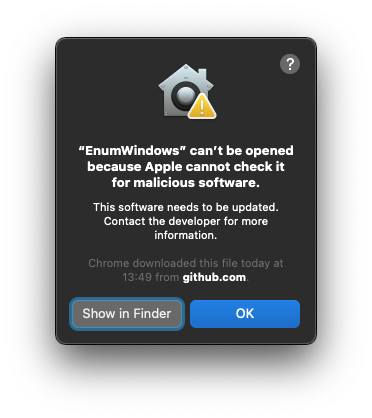
OK, I've got it working now — thanks.
For clarity for anyone else who comes across this, it seems that what you need to do is ensure that EnumWindows is explicitly "opened", and that simply double-clicking it is not sufficient. I suspect that any of the following will work:
* Selecting it in Finder and selecting "File/Open" in the menubar.
* Right-clicking it in Finder and selecting "Open" in the context menu that pops up — this is what I did that worked.
* Holding down the option key and double-clicking it in Finder — I guess this is what @ayroblu is suggesting above, i.e. "the weird option click hack".
* Finding it in the Terminal and running it via the `open` utility, i.e. `open ./EnumWindows`
---
What I'd tried previously, which hadn't worked, was:
* Double-clicking it in the Finder (i.e. without the option key).
* Running it directly in the Terminal, i.e. `./EnumWindows`
I had assumed (and my experience had always been) that double-clicking on any file would always perform the default Open action and thus have exactly the same outcome as explicitly selecting "Open" as described above (which for an executable such as `EnumWindows` would be to run it) — so I'm surprised to find this counterexample, where it seems it really needs to be explicitly *opened* to get the option to say "yes, really run this please". I guess this is one of the quirks of MacOS security. TIL.