Hi and thanks for the awesome plugin!
I get a `Decode failed` error message when pasting exceptions in the decode window although I know the exception can be decoded.
- Platform is Arduino 1.8.19 on Linux amd64
- Package version is 2.0.2
- :warning: Package folder is `~/.arduino15/packages/esp32-2.0.2/`
- :warning: [package_xx_index.json](https://phpsecu.re/esp32/packages/package_esp32_esp32-2.0.2_index.json) is customised accordingly.
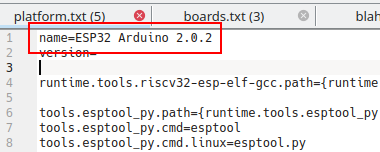
- :warning: platform.txt is also using `name=ESP32 Arduino 2.0.2` instead of `name=ESP32`


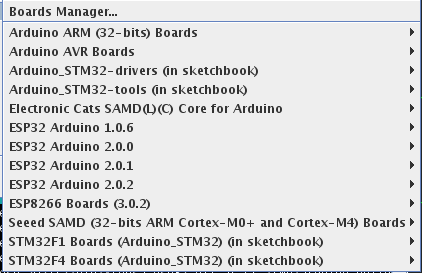
Note: using a custom package_index.json lets me have several **isolated** package versions in the arduino menu, which is a relief for library development and local testing.
Apart from the exception decoder, every other tool work fine, and no other side effect from using this custom layout has been observed so far.
I have seen this same issue on my end as well. I think it's related to the toolchain, because trying to decode directly also does not produce anything. Previous versions Arduino-ESP32 work ok?
I've tested `printf("%s, millis())` crash code on all 2.x.x versions and the behaviour is similar, but I need a better crash code as 1.0.6 compiler prevents such usage :-)
The other java tool I'm using `ESP32 Sketch Data Upload` is not affected and works as expected.
More details on the custom package:
The `name` and `packager` properties have been changed so that the boards manager does not mix paths when searching for tools, libraries, etc.

Every `platform.txt` uses a modified `name` property, this is to avoid duplicate/nonsensical `ESP32 Arduino` entries in the boards menu.
so you say the same result with 2.0.1 and 2.0.0 and 1.0.6? And you are using the proper toolchains for the versions? As I said, the toolchain is the one not returning anything from parsing the backtrace, it's not the exception decoder that does not rpint it.
@igrr any clues?
Do I need to setup a specific environment to recompile this plugin?
I've already played with Arduino IDE Java source in the past so I can eventually do some test/debug.
[edit] just found the make.sh file :facepalm:
I modified the plugin to print the dbg command in the textarea, recompiled, and got this when pasting a stack trace:
```
/home/tobozo/.arduino15/packages/esp32-2.0.2/tools/xtensa-esp32-elf-gcc/gcc8_4_0-esp-2021r2/
bin/xtensa-esp32-elf-gdb --batch /tmp/arduino_build_958796/crash-esp32.ino.elf -ex set listsize 1
-ex l *0x4008732e -ex l *0x400e17cb -ex l *0x400e6855 -ex l *0x400e689b -ex l *0x400d14a2
-ex l *0x400d102d -ex l *0x400d1912 -ex q
```
running that command from a shell returns an obvious error since there's no virtualenv in that shell, but it confirms that the gdb tool is reachable.
`xtensa-esp32-elf-gdb: error while loading shared libraries: libpython2.7.so.1.0`
[edit]
also tried the precompiled version from previous message, here's the output:
```
PC: 0x40087331
EXCVADDR: 0x00000384
Decoding stack results
Decode Failed
```
BTW the zip I gave you up there outputs more than just the gdb command being executed :) glad you figured it out though. I guess we are waiting on the toolchain team to get this resolved.
Had a very accomplished Linux friend help me work through this issue...
first was copying the commands out of the Arduino log window, and trying them in the Terminal. The following error resulted:
`........xtensa-esp32-elf-gdb: error while loading shared libraries: libpython2.7.so.1.0: cannot open shared object file: No such file or directory`
At least in my case (Ubuntu 22.04 LTS), I only needed to install "libpython2.7"--and further attempts to create a symlink resulted in a "file exists" error. Ran the exception decoder--and it worked perfectly right away.
`sudo apt-get install libpython2.7`
@tobozo I can decode your stacktrace as well--though of course it's completely useless when based off my project's ELF file ;-)
@WebDust21 what's the architecture on your Ubuntu 22.04?
Doing this on my Ubuntu 20.04 for x64 results in `wrong ELF class: ELFCLASS64` error message.
> libpython2.7 is already the newest version (2.7.18-1~20.04.1).
I'm also on 64-bit (x86_64).
A terminal run of "ldconfig -v | grep libpython" returns the following (after a bunch of "given more than once" notices):
```
libpython2.7.so.1.0 -> libpython2.7.so.1.0
libpython3.10.so.1.0 -> libpython3.10.so.1.0
```
I'm not necessarily a Linux guru, but maybe something will jump out ;-)
not that different, but those are x64 versions and expected to be there anyway
libpython3.9.so.1.0 -> libpython3.9.so.1.0
libpython3.8.so.1.0 -> libpython3.8.so.1.0
libpython2.7.so.1.0 -> libpython2.7.so.1.0
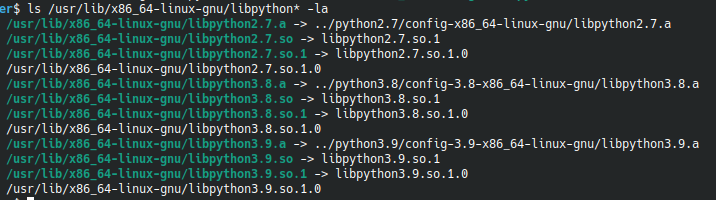
What my system is really missing is `/usr/lib/[some other architecture]/libpython2.7.so.1.0`. However it's already partially rotting with three different versions of python already, and it feels very much like this particular dependency should come as part of the espressif sdk, and not be installed by hacking my own OS.
Running the same command you did, I get the following:
```
ls /usr/lib/x86_64-linux-gnu/libpython* -la
lrwxrwxrwx 1 root root 19 Mar 12 01:24 /usr/lib/x86_64-linux-gnu/libpython2.7.so.1 -> libpython2.7.so.1.0
-rw-r--r-- 1 root root 3414800 Mar 12 01:24 /usr/lib/x86_64-linux-gnu/libpython2.7.so.1.0
lrwxrwxrwx 1 root root 58 Apr 2 05:04 /usr/lib/x86_64-linux-gnu/libpython3.10.a -> ../python3.10/config-3.10-x86_64-linux-gnu/libpython3.10.a
lrwxrwxrwx 1 root root 18 Apr 2 05:04 /usr/lib/x86_64-linux-gnu/libpython3.10.so -> libpython3.10.so.1
lrwxrwxrwx 1 root root 20 Apr 27 10:41 /usr/lib/x86_64-linux-gnu/libpython3.10.so.1 -> libpython3.10.so.1.0
-rw-r--r-- 1 root root 5839264 Apr 2 05:04 /usr/lib/x86_64-linux-gnu/libpython3.10.so.1.0
```
Yes, I agree it should be fixed in espressif--BUT until they feel like doing that, it's kinda nice to be able to use the tools and be able to solve issues. Some things they just won't care to fix or support (not that I'm saying this is one of them!)--and we just have to be able to patch things together to get the end result we want/need.