如何构建像您这样的github page
#23 · closed · 3 comments
View on GitHub ↗
[](https://github.yixuju.cn/hub-mirror/)
@yi-Xu-0100 您好,我也想做一个像您的这个仓库以及另一个[仓库](https://qsctech.github.io/zju-icicles/)的page一样的效果(可以看到文件夹下的md文档),请问该如何操作?我以为只要把主题文件`_config.yml"放到master分支里就行了,但似乎不是这样。。。
这是我的[仓库](https://github.com/whitewatercn/great-doctor)和[page](https://whitewatercn.github.io/great-doctor/)链接,如果您有时间到话,麻烦您教一下我怎么办,或者告诉我从哪里可以学习🙏
Comments
@whitewatercn 我的仓库很简单,功能上也没有你所说的另一个仓库的功能完善。
1. 我的仓库使用的是 github 的默认模板构建,指定主题文件后。在设置的 page 页面可以选择一些默认的模板完成构建。
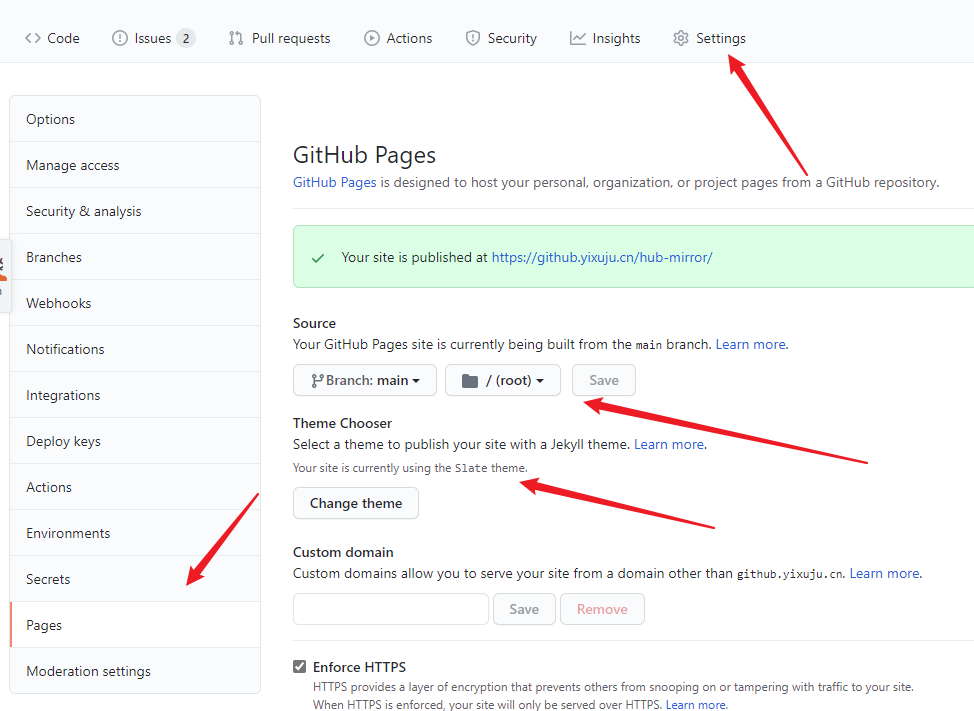
2. 你所指的另一个仓库,我看了一下,在 workflows 中使用了 mkdocs 构建 GitHub page
https://github.com/QSCTech/zju-icicles/blob/master/.github/workflows/main.yml
你可以先试着 google 本地使用 mkdocs 构建页面,然后去那个仓库的 workflow 中看看具体的使用方法。
@whitewatercn 你也可以参考我的 [purewriter-FAQ](https://github.com/yi-Xu-0100/purewriter-FAQ) 和 [Application-Lists](https://github.com/yi-Xu-0100/Application-Lists) 等仓库利用 docsify 来构建页面。我的仓库中都配置了同步和自动部署。可以参考。具体等等配置项可能有的有点陈旧,多对比不同和看自己的需求来做。
好的!谢谢!我先去学习一下