


An all-in-one toolkit for userChrome.css Firefox themes.
Try and install themes, build them with live editing, and keep them tested
with visual previews and Firefox compatibility checks.
You need Python 3.9+ and an installed Firefox on macOS, Windows or Linux. Install fxcss with its image tools, then try a theme in a disposable profile:
pipx install "fxcss[images]"
fxcss try AdamXweb/WhiteSurFirefoxThemeMacOS
Close the preview window when you are done; your everyday Firefox profile is unchanged. See installation options if you do not have pipx.
Choose what you want to do next:
| I want to… | Next step |
|---|---|
| Use a theme in my everyday browser | Install it, then check updates, change options or roll back. |
| Create or edit a theme | Start a theme, see edits live and inspect Firefox's interface. |
| Maintain a theme on GitHub | Generate workflows for PR previews and scheduled Firefox checks. |
For local development and testing, run commands from the theme's root (the
folder containing chrome/), or pass --theme /path/to/theme. Use
fxcss <command> --help for its options.
| Section | What you can do |
|---|---|
| Using and managing themes | Preview, install, adopt, update, roll back and remove themes; see what is installed in each profile. |
| Building and inspecting themes | Start a theme, reload CSS live and find the selectors and rules behind the UI. |
| Testing appearance | Run saved project checks, capture browser states and review visual differences. |
| Tracking Firefox compatibility | Save structural snapshots, compare Firefox builds and audit theme breakage. |
| GitHub Actions workflows | Automate PR previews, Firefox checks and screenshot publishing. |
| Documenting and showcasing themes | Explain install options with images and generate a visual UI reference. |
| Troubleshooting and configuration | Diagnose setup problems, choose installation options and understand capture limits. |
| Commands | Jump directly to any command. |
Previewing, editing and browser testing use disposable profiles. The theme
management commands install, adopt, upgrade, rollback and uninstall
work on a selected real profile; profiles only reads it.
Start with a preview, then install into the profile you choose. fxcss records
what it installs, checks for local edits before upgrades and keeps backups
when replacing an existing theme. Already have a manually installed theme?
Use adopt to bring it under management.
Looking for a theme? Browse the Firefox CSS Store
or r/FirefoxCSS, then pass its GitHub
repository to fxcss try.
fxcss try adamXweb/WhiteSurFirefoxThemeMacOS
fxcss try github.com/owner/theme --with compact-tabs
fxcss try owner/theme --info            # report what's there, launch nothing
Test-drive a theme before committing to it. Downloads it, installs it into a throwaway profile, and opens Firefox so you can actually use it. Your own profile is never touched — close the window and nothing remains.
It reports what it found before doing anything:
  adamxweb/whitesurfirefoxthememacos  ★614  MIT
    MacOS Big Sur like theme for Firefox on MacOS & Windows.
    latest release   v1.6.3  (2025-07-26)
    latest commit    b10c574  (2025-07-26)  Merge pull request #167 …

  fetching release v1.6.3 …
  theme found at the repository root  (39 stylesheets, 134 KB)

  This theme ships install.sh. fxcss does not run it —
  it installs the files itself, which is all those scripts do.

  Options its README documents:
    -c     Left hand side tab close button
    -p     Makes tabs height compact like current Safari
    …

  Optional stylesheets you can layer on with --with:
    compact-tabs, hideextension, noidentity, tabs-swapclose, …
Releases are preferred over branch tips, since that is what the author blessed;
--commit takes the latest commit instead, and --ref takes any tag, branch or
SHA. --with name,name layers on the theme's optional stylesheets so you can see
a variant without hunting through install flags. --shot dir captures the
standard screenshots instead of opening a window, and --keep dir leaves the
download behind so you can start editing it with watch.
fxcss installs the theme's files and supported preferences itself. It reports any installer it finds and reads the options documented in the theme's README. A theme that requires additional setup outside those files and preferences may still need manual steps.
What is left is the theme's own content: CSS, SVG, and occasionally a .js file.
Firefox does not execute a .js file sitting in a profile's chrome folder; that
requires an autoconfig hook in the application directory, which fxcss does not
create. Archives are size-capped and path-checked on extraction, and symlinks in
them are skipped.
If you decide you want the theme permanently, fxcss install is the same
resolution and the same file copying — pointed, deliberately, at your real
profile.
fxcss install owner/theme                      # into your default profile
fxcss install owner/theme --with compact-tabs  # optional sheets, permanently
fxcss install ~/src/my-theme                   # a local checkout works too
fxcss install --list-profiles                  # see what it found first
Put a theme into the Firefox profile you actually use — the cross-platform
replacement for each theme's own install.sh (and the answer for themes whose
install script never covered Windows). Resolution is the same as try:
a GitHub owner/name or URL with --ref/--commit, or a local directory.
As with try, the theme's own install script is never executed.
It finds your real profiles by parsing profiles.ini in the platform's
Firefox directory (macOS ~/Library/Application Support/Firefox, Windows
%APPDATA%\Mozilla\Firefox, Linux ~/.mozilla/firefox plus the snap and
flatpak locations) and installs into the profile Firefox itself would open.
--profile <name-or-path> overrides; with several profiles and no clear
default, interactive runs get a picker and scripts get an error — CI is never
prompted. Profiles kept somewhere unusual can be added to the search with
FXCSS_PROFILE_ROOTS=/path/to/dir, mirroring FXCSS_FIREFOX_ROOTS.
Firefox's default profile decides only for install, which is choosing where
to put a theme. Every command that acts on one already installed —
uninstall, upgrade, rollback — looks for the profile that has it,
so a theme installed deliberately into your Developer Edition profile is
still found by a bare fxcss uninstall. adopt looks for the opposite: a
chrome/ folder fxcss did not install. Firefox's default breaks the tie only
when more than one profile qualifies, and --profile always wins.
The picker and --list-profiles say which Firefox each profile belongs to,
because default-release and dev-edition-default are one word apart in a
list of hashed directory names — and installing into the wrong one looks
exactly like the theme not working:
Several Firefox profiles exist:
  1. default-release        [Release]              …/Profiles/8f2b1a.default-release  (Enter)
  2. dev-edition-default    [Developer Edition]    …/Profiles/c41d9e.dev-edition-default
  3. work                   [unrecognised]         …/Profiles/7ab3.work
The label comes from the directory suffix Firefox itself assigns, so a profile
you named yourself reads [unrecognised] rather than being guessed at.
Run it without --with and it offers the theme's optional stylesheets rather
than leaving you to find them in the repository:
  This theme ships optional stylesheets:
    1. compact-tabs
    2. theme-dracula
    …
    Numbers separated by commas, `all`, or Enter for none.
  Include:
Some of a theme's optional sheets are alternatives rather than additions.
Installing two colour themes is two @imports, and nothing about that warns
you — the later one silently wins outright, leaving a browser that looks like
neither the one you picked nor the one before it. install measures for this
and stops:
$ fxcss install AdamXweb/WhiteSurFirefoxThemeMacOS --with theme-nord,theme-dracula

  theme-dracula and theme-nord are alternatives, not additions: both set the
  same 122 declaration(s), so whichever loads last replaces the other entirely
    :root { --gnome-browser-before-load-background: #282a36 }  vs  { …: #2e3440 }

  Refusing to install stylesheets that cancel each other out — only one
  of them would have any effect, and which one is decided by import
  order rather than by you. Pick one, or pass --force.
It is a measurement, not a guess about names. Two sheets are alternatives when
they set the same properties on the same selectors — provable from their
text, and true whatever they are called. Matching on a theme- prefix would
be a convention rather than a fact: it would tell a theme shipping theme-blue
and theme-compact that those clash when they compose perfectly well, and
miss a pair named dark.css and nord.css. Sheets that agree exactly are not
in conflict, because two options setting the same border radius the same way
compete for nothing.
try reports the same thing and continues — a throwaway profile is a fine
place to watch two colour themes cancel out — and tweaks says so before
screenshotting a --combo that cannot take effect.
What this does not see. It compares declarations, so it catches sheets fighting over the same property. Two sheets that rearrange the same area through different selectors — WhiteSur's
tabs-swapcloseandwindows-swapcloseboth move a close button and share no declarations at all — are invisible to it.fxcss tweaks --combo a+bproves those from the rendered pixels — and says so itself: a combo that renders identically to one of its parts alone is called out in TWEAKS.md as not a real combination on that Firefox. Silence from the static check is "nothing measurable", never "verified compatible"; the pixels are the judge.
When the theme's default branch has moved on since its newest release, that choice is put to you as well — a tag can be a year behind a fix you are looking for, and equally the branch can be mid-rewrite, so neither is right to assume:
  The default branch has moved on since the latest release:
    1. release v2.0                 2025-01-03  what the author last published  (Enter)
    2. latest commit on master      2026-08-14  newer than the release — fix tab colours
  Install [1-2]:
Scripts and CI never see any of these prompts: without a terminal the release
wins, as before, with a one-line note that --commit exists.
The install is what a theme's install script does, done carefully:
- the complete replacement is prepared before your existing
chrome/moves to a timestampedchrome.backup-*sibling; a failed swap restores it; - any
--withoptional sheets go where the theme's own@imports expect them, or load after the base theme through an import-only wrapper; toolkit.legacyUserProfileCustomizations.stylesheetsis enabled inuser.js— inside a clearly marked block, so it can be removed cleanly — together with anyconfiguration/user.jsthe theme ships;- a manifest (
chrome/fxcss-install.json) records every file written, its sha256, and where the theme came from — which repo, which ref, and whether that ref was a release or a branch.
Restart Firefox after installation; it reads userChrome.css at startup.
See uninstall to remove a theme later.
fxcss adopt owner/theme              # identify what is already installed
fxcss adopt                          # …if chrome/ says where it came from
fxcss adopt owner/theme --ref v2.0.0 # check against one version only
Most themed profiles were not themed by fxcss — someone ran the theme's
install.sh, or copied a chrome/ folder in by hand, long before any of this.
fxcss profiles can describe those, but nothing can act on them: there is no
record of what the theme is. adopt writes that record, and then upgrade,
rollback and uninstall all work.
It identifies the theme by its contents. Every file under chrome/ is
hashed exactly the way git hashes a blob and compared against the repository's
own tree at each recent version. A version where every file matches is not a
guess — it is the same bytes:
$ fxcss adopt AdamXweb/WhiteSurFirefoxThemeMacOS

  profile: default-release  (~/Library/…/8f2h1kqp.default-release)

  comparing 148 file(s) against AdamXweb/WhiteSurFirefoxThemeMacOS …
    v2.0.0: 129/135 files match, 6 edited, 7 added
    v1.6.3: 114/132 files match, 18 edited, 10 added

  best match: v2.0.0: 129/135 files match, 6 edited, 7 added
  Recorded as that version plus local differences, so an upgrade knows
  not to overwrite them without being told.
Comparison uses GitHub's git-tree API rather than downloading anything, so checking ten versions costs ten small requests instead of ten archives — and archives are the first thing GitHub rate-limits.
Naming the repository is usually necessary. adopt checks chrome/ for a git
remote (definitive — someone cloned it there) and for GitHub URLs in the
theme's own files (a hint worth confirming), but plenty of themes leave no
trace at all once installed: WhiteSur's chrome/ contains no URL anywhere.
That is normal, not a failure, and the message says so.
Nothing is installed or replaced. The chrome/ already there is copied
to a chrome.backup-* and then described, so uninstall has somewhere to put
things back to — verified as a byte-identical round trip. user.js is left
exactly as it is: the pref that turns userChrome.css on is evidently already
set, since the theme is working, and writing an fxcss block to say so again
would edit a file for no gain. The next upgrade writes one properly, from the
theme it fetches.
Files that already differed from the release are recorded, and
upgrade treats them exactly like edits made after an
install — it will not overwrite them without --force. That matters here more
than anywhere: a theme someone has been hand-editing for a year is the most
likely thing to be adopted.
Two versions can also be identical in content while differing in line endings, which is what a Windows clone with
core.autocrlfproduces. That is reported as a match, noting the difference, rather than as "nothing matches".
fxcss profiles                       # what is themed where
fxcss profiles --check               # …and whether anything newer exists
fxcss profiles --json                # machine-readable
Read-only. Firefox keeps its profiles in directories named after a hash, so it can be hard to tell which profile has the theme by looking at folder names:
$ fxcss profiles --check

  Firefox profiles on this machine

  ● default-release          [Release]
    ~/Library/Application Support/Firefox/Profiles/8f2h1kqp.default-release
    theme    AdamXweb/WhiteSurFirefoxThemeMacOS @ v1.0.0
             installed 2026-08-14 09:12:44  (tracking the release)
    sheets   theme-nord
    files    137 file(s), 1 edited since install, 1 added by hand
    update   v2.0.0 available  — 2026-08-16

    dev-edition-default      [Developer Edition]
    ~/Library/Application Support/Firefox/Profiles/p93kd0zx.dev-edition-default
    chrome/  41 file(s), not installed by fxcss
             `fxcss install` here would back this up first

  ● the profile Firefox opens by default
Three states, kept distinct on purpose: a profile fxcss installed into and can
speak for, a profile with a chrome/ folder someone put there by hand, and a
profile with no theme at all. Only the first can be described in detail; for
the second, all fxcss honestly knows is that files are there and that
installing would move them aside.
--check asks GitHub once per theme, not once per profile, and compares like
for like: an install tracking releases is measured against the newest tag, one
tracking a branch against the commit that branch points at now. An install
pinned with --ref reports as pinned rather than as behind. Where the
manifest predates fxcss recording which of those applied, it says so instead
of guessing — "up to date" is never printed unless it was actually checked.
The same reservation covers local edits: installs from before 0.16 recorded no
file hashes, so fxcss profiles reports them as not checked for edits
rather than as unmodified. Reinstalling records them.
fxcss upgrade                        # take the newest version of what you have
fxcss upgrade --check                # report only; exit code says what it found
fxcss upgrade --audit                # check the new version against your Firefox first
fxcss upgrade --compare              # see it before deciding: installed vs new, rendered
fxcss upgrade --ref v2.1.0           # somewhere specific
fxcss rollback                       # …and back again
upgrade updates the installed theme, not Firefox itself. It re-installs the theme the profile already has, at whatever is newest
of the kind it tracks: an install that took a release moves to the newest
tag, one that followed a branch moves to that branch's current commit, and one
pinned with --ref does not move at all unless you say so.
It stops rather than surprise you, in three places:
- Files you edited yourself. Every install records a sha256 per file, so
an upgrade knows which ones you have since changed and refuses to write over
them until
--force. Files you added are never touched either way. - Options that vanished. If you installed
--with theme-nordand the new version renamed or dropped that sheet, the@importwould simply stop resolving and the option would turn itself off.upgradenames the loss and makes you choose instead. - Selectors the new version needs and your Firefox lacks — with
--audit, which runs the same check asfxcss auditagainst the fetched copy before anything is installed.
--compare renders what is installed and what the upgrade would install —
the profile's own chrome/, local edits and carried-over sheets included, not
a re-fetch of what the manifest says — and diffs them before the confirmation
prompt, printing where the before/after images landed. It completes the three
questions an upgrade can answer about a theme with no API: do the selectors
still exist (--audit), has the user edited anything (always checked), and
what actually changes on screen (--compare). Needs Pillow and a local
Firefox, like shot.
--check changes nothing and answers with its exit code, for cron, launchd or
CI: 0 up to date, 1 an upgrade is available, 2 it cannot be told
(no install here, an unreachable repo, or a manifest too old to say what it
tracked). fxcss deliberately ships no scheduler of its own — this is the piece
you point yours at.
$ fxcss upgrade

  profile: default-release  (~/Library/…/8f2h1kqp.default-release)
  installed: AdamXweb/WhiteSurFirefoxThemeMacOS @ v1.6.3
  upstream:  v2.0.0  — 2026-08-16

  fetching v2.0.0 …
  keeping optional sheets: theme-nord

  Upgrade to v2.0.0? [Y/n]

  upgraded to v2.0.0
  the previous version is kept as chrome.backup-20260817014202

Restart Firefox to see it. `fxcss rollback` puts the previous version back.Restore the newest backup, or choose one by name:
fxcss rollback
fxcss rollback --list
fxcss rollback --to chrome.backup-20260817014202
Installs and upgrades that replace an existing chrome/ keep it as a
chrome.backup-*. Managed backups include the installation record, so the
list can show what each one holds:
$ fxcss rollback --list

  Backups, newest first:

    chrome.backup-20260817014202
      AdamXweb/[email protected]
    chrome.backup-20260817014143  (the original)
      your own chrome/, from before fxcss
fxcss rollback restores the most recent, or --to <name> any of them.
What was installed becomes a backup in its turn, so a rollback can itself be
rolled back, and user.js follows: each version records the prefs it asked
for, and rolling back to the original — the one backup with no manifest in it,
because it is your chrome folder from before any of this — takes the fxcss
pref block out with it.
That original is the reason upgrades chain rather than stack blindly. After
five upgrades the newest backup holds the theme, not your files, so the
manifest carries the original's name forward and fxcss uninstall still
restores what you had before you ever ran fxcss. --keep N (default 3) prunes
older backups; the original is never one of them.
fxcss uninstall
fxcss uninstall --profile default-release
Removes the managed theme and its user.js preference block. Recorded files
are removed only when their hashes still match; added, edited, unreadable or
unverifiable files are kept. If nothing needs to be retained, the original
chrome/ backup is restored. Otherwise the backup stays alongside the retained
files so it cannot overwrite your work.
If the profile originally had no chrome/, uninstalling after an upgrade
returns it to that state when no files need to be kept. Restart Firefox to see
the result.
Work on Firefox's tabs, toolbars and other browser UI with a live preview. Use the picker to find an element, then inspect the rules behind it. All of these browser sessions use disposable profiles.
fxcss new my-theme
cd my-theme
fxcss watch
Creates a small working theme you can edit immediately. Save changes to
chrome/userChrome.css while watch is running to see them in Firefox. Stop
with Ctrl-C when you want to run another command. The starter is also used by
fxcss's own browser tests; an existing non-empty directory is left alone.
fxcss watchOpens Firefox with your theme applied and watches chrome/ and custom/. Save
a CSS file in your editor and the running window reloads it automatically.
The window is yours to drive — open menus, resize it, type in the address bar, right-click things. Nothing is scripted.
Reloads reach every chrome document, not just the browser window: new windows,
and separate documents like the window-modal dialog (the quit prompt), pick up
your edits too — the same reach an installed userChrome.css has.

| flag | effect |
|---|---|
--dark |
start in dark mode, for testing prefers-color-scheme rules |
--native-menus=false |
make right-click menus themeable (see Context menus) |
--shot out.png |
write a screenshot after every reload |
--no-devtools |
don't enable the Browser Toolbox |
fxcss pickThe answer to "what is this thing called?" Move the mouse over the browser window and the element under the cursor is outlined, with its selector shown in a label:

Click it and your terminal prints everything you need:
  toolbarbutton  →  #back-button
  classes   toolbarbutton-1 chromeclass-toolbar-additional
  box       32×36 at (88, 8)
  styles
    color: rgba(46, 52, 54, 0.35)
    border-radius: 8px
    list-style-image: url("chrome://browser/skin/back.svg")
  styled by 11 rules in this theme
    chrome/parts/buttons-fixes.css:5    :root:not([uidensity=compact]) #back-button {
    chrome/parts/custom-icons.css:6     #nav-bar #back-button .toolbarbutton-icon {
    chrome/parts/headerbar.css:76       #nav-bar #back-button:not(#hack) {
That last section is the useful part: not just what the element is, but which of your files already style it, with line numbers. Keep clicking to pick more; Esc in the browser or Ctrl-C in the terminal stops.
fxcss inspect '#urlbar'
fxcss inspect '.tab-close-button' --dark
The same report, for a selector you already have. Useful for checking whether a selector still matches anything after a Firefox update — a common cause of themes quietly breaking.
If it matches nothing, it says so:
$ fxcss inspect '#urlbar-background'
no elements match '#urlbar-background' in this Firefox
That is a real example, not a contrived one: this repo's own example theme
styled #urlbar-background by id, which many older themes still do. The id was
replaced by a class, so the rule silently did nothing and the address bar
rendered unstyled. One command found it; the fix was .urlbar-background.
Firefox's normal inspector only sees page content. The Browser Toolbox is
the version that can inspect the browser's own UI, and it's off by default
behind four prefs. fxcss turns them on in its throwaway profile, so in watch
and pick you can just press:
- macOS —
Cmd+Opt+Shift+I - Windows / Linux —
Ctrl+Alt+Shift+I
You get a full inspector over the browser chrome: hover to highlight, read
computed styles, and live-edit rules to try things before committing them to
your CSS. fxcss pick is the fast path for "what is this called"; the Browser
Toolbox is the thorough one for "why is this rule not winning".
Use fxcss check for an audit, screenshots and a combined
report. Use shot and compare separately when you want to control each step.
Capture the same browser states before and after a theme change, then inspect what moved or changed colour:
fxcss shot --out shots/before --variants all
# Edit your theme, then capture it again.
fxcss shot --out shots/after --variants all
fxcss compare --base shots/before --head shots/after --out diff/
Keep the Firefox build, operating system and capture settings the same when
reviewing a CSS change. For a Firefox update, keep the theme unchanged and
capture each browser build with --firefox.
fxcss checkRuns a compatibility audit and captures the theme in a disposable Firefox
profile. It writes a Markdown report, a machine-readable summary.json, logs
and screenshots into a fresh run folder under .fxcss/checks/. Without a
configuration file, it uses installed Stable, captures all optional
stylesheets and fails on actionable selector findings. Visual comparison is
enabled when you supply a baseline.
The terminal shows the current phase and each accounted-for view, including
views Firefox explicitly does not support, while the full details stay in the
run logs. The report links directly to each captured screenshot and distinguishes
a check with no visual baseline from one with advisory image changes. When
comparing captures, it shows the baseline and current Firefox environments so
you can spot version, OS, display-scale or window-size differences. If you
interrupt a run, check still writes a report pointing to completed captures;
views left unfinished are marked separately from failures. Rerun the
command to finish. If interruption occurs during a baseline update, inspect
the baseline directory before running another update.
Save settings in .fxcss.json at the theme's root to use the same checks
locally and in CI:
{
  "firefox": ["stable"],
  "variants": "all",
  "baseline": ".fxcss/baseline",
  "out": ".fxcss/checks",
  "strict": true,
  "strict_vars": false,
  "max_changed_percent": 0.1
}
Create a baseline explicitly, then compare later runs against it:
fxcss check --update-baseline
# Edit the theme, then review the combined report.
fxcss check
--update-baseline accepts new captures only when every configured browser's
audit and capture succeed under your settings. It skips comparison with the
old baseline during that run. Existing baselines are preserved on a failed
check; normal runs never replace them. Review the new captures when accepting
a baseline. Existing directories not created by check are not replaced.
Every standard view and selected option must be accounted for in
capture-coverage.json: captured, explicitly unsupported, or failed. A missing
view or failed browser state prevents baseline updates, even on the first run.
Baselines made before coverage reports were added must be captured again.
Add installed channels such as "beta" or "nightly" to the browser list;
each gets a separate baseline. Missing browsers are reported as errors while
the remaining browsers are still checked. Keep baselines for different
operating systems separate. --firefox beta overrides the list for one run.
| Setting or option | Behavior |
|---|---|
strict / --strict |
Fail on actionable selector findings; --no-strict makes them advisory. |
strict_vars / --strict-vars |
Also fail on dead custom properties; deliberate fxcss-keep overrides remain exempt. |
max_changed_percent / --max-changed-percent |
Fail when any view exceeds this percentage, or a new view has no baseline. Set the saved value to null for advisory pixel differences. Missing baseline views always need attention. |
variants / --variants |
Capture all, named stylesheets or combinations such as compact+dark. Set the saved value to null to capture the base theme only. |
toolbar / --toolbar |
Apply a toolbar arrangement to the toolbar capture. |
baseline, out |
Paths relative to the theme root; absolute paths also work. baseline: null runs audits and captures without visual comparison. |
--config FILE |
Read a different JSON settings file. Command-line options override saved values. |
Exit codes are 0 for completed checks within the configured policy, 1 for findings, and 2 for interruption or configuration, browser, capture or comparison errors. A configured baseline that is missing is an error, not an unchanged result. Invalid settings fail before Firefox is started.
For a custom GitHub workflow with Firefox and a display already available,
run fxcss check and upload .fxcss/checks/ even when the check fails. Keep the
baseline available in the checkout or download it before checking; update it
explicitly when accepting a theme change. Use --firefox "$FIREFOX_BIN" when a
runner installs Firefox outside the usual locations. Add generated check reports to your
theme repository's .gitignore if you do not intend to commit them.
fxcss shot --out shots/beforeCaptures the standard set of views as PNGs: browser window, focused address bar, find bar and the window-modal dialog in light and dark, then playing and muted audio tab indicators, container tabs, an overflowing tab strip, a private window, compact density, the sidebar, right-to-left chrome, and customize mode.
Audio views set Firefox's playing and muted tab attributes directly. They test the appearance of those indicators without requiring a sound device or playing a tone. CI also verifies that CSS targeting each state changes its screenshot.
The dialog view is the quit-confirmation prompt (commonDialog), opened for real. It is its own chrome document, painted from different rules than the window around it, which is why themes break it without noticing — a dark theme whose dialog body renders white shows up here and nowhere else.
The captures land flat in --out, one file per view (shots/before/light-01-window.png);
--url captures go to <out>/live/. This is the directory to publish from if
you want plain screenshots — fxcss compare writes a different shape, below.
fxcss shot --out shots --variants all--variants also captures one view per optional stylesheet the theme
ships (custom/, optional/, variants/…), each loaded on its own and removed
again — so tabs-swapclose or compact-tabs are checked by CI without a
separate install. Name specific ones (--variants a,b) or take them all.
fxcss shot renders a standard set of views, so a change is judged against the
states people actually use rather than one idle window: light and dark, the
focused address bar, find bar, modal dialog, audio and muted tabs, container
tabs, an overflowing tab strip, a private window, compact density,
right-to-left chrome, Customize
mode — and three that a theme is most likely to have never been tested in:
- Sidebar — bookmarks and history. Both panels, with their trees expanded, because a fresh profile shows them collapsed and a collapsed panel has almost nothing in it to style.
- Vertical tabs. Firefox 133+ does not restyle the tab strip here, it
moves it:
#tabbrowser-tabsleaves#TabsToolbarfor#vertical-tabs, so every#TabsToolbar > …rule a theme owns silently stops matching while its unscoped.tabbrowser-tabrules keep applying horizontal geometry to a vertical column. Older builds without vertical tabs skip the view. - Customised toolbar. The nav bar with widgets moved into it — by default including the new tab button, which is the rearrangement plenty of theme READMEs ask users to make by hand and which nothing could test until now.
Set your own arrangement with --toolbar, on shot, watch or try:
fxcss watch --toolbar "new-tab-button>nav-bar, -downloads-button"
fxcss shot  --toolbar "home-button>nav-bar@0" --out shots/
widget>area moves a widget (optionally @position), -widget removes one.
Areas are nav-bar, TabsToolbar, PersonalToolbar, vertical-tabs,
unified-extensions-area. A widget id Firefox does not recognise is reported
rather than ignored — Firefox itself accepts any string and then quietly
renders nothing.
Some states depend on the Firefox build; unavailable states are reported and skipped rather than treated as captured.
fxcss compare --base shots/before --head shots/after --out diff/Diffs two sets and writes one stacked before / after / changed-pixels image per view that differs. Views that render identically are reported rather than pictured, so you only look at what actually changed.
--out therefore holds comparison images for changed views only, plus a
summary.json and a full/ directory carrying a normalised copy of every
head capture, changed or not. So <out>/full/ is what a preview comment shows
when nothing differs — and shot's own --out (flat, no full/) is what to
read when you just want the screenshots.
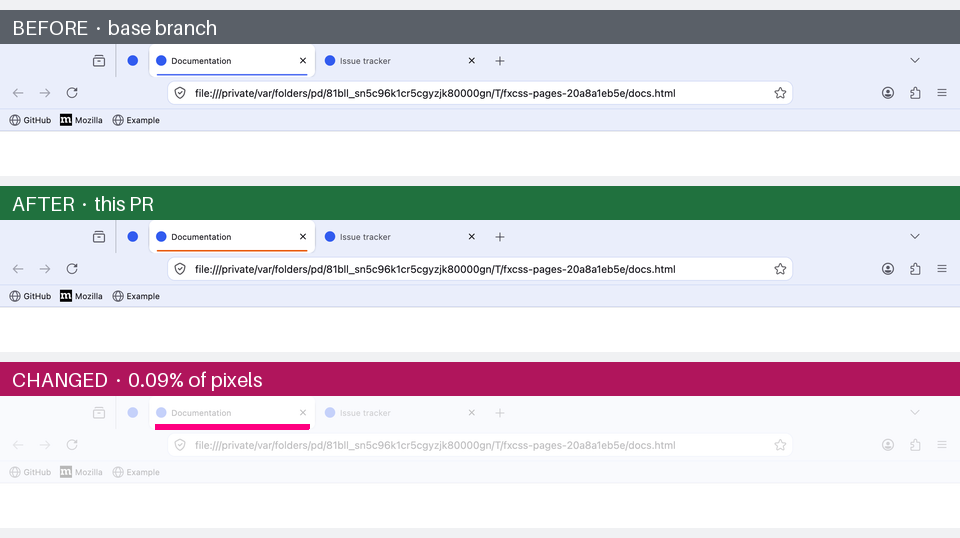
One changed value — the accent colour behind the active tab. The bottom panel highlights the 0.09% of pixels that moved.
This is what makes it useful in CI: render your theme at the base commit and at a pull request, and the diff shows a reviewer exactly what the change does. See Using it in CI.
A successful comparison reports differences; changed pixels alone do not make
compare fail. Review the images to decide whether a change is intended. If
your project needs a pass/fail threshold, use fxcss check or a custom check
using summary.json. Added and missing views are reported as changes. Missing,
empty or unreadable screenshot inputs return an error. Reusing an output
directory clears the previous report's generated images so stale comparisons
do not survive into a new result.
Firefox changes can leave a theme partly unstyled even when its CSS still loads. These tools help you inspect the browser you have and prepare for the builds your users will get next.
| Tool | What it tells you |
|---|---|
snapshot |
Which browser UI IDs and classes were observed in a Firefox build; saves a JSON baseline. |
changelog |
Which names changed between that baseline and another build, and which removals the theme uses. |
audit |
Which selectors and custom properties need attention in the selected Firefox, with suggested fixes. |
A snapshot records structure; shot records appearance. Neither is a profile
backup. Use audits and visual comparisons together: a selector can still
exist while its layout looks wrong.
Every command that opens a browser takes a channel name as well as a path:
fxcss watch --firefox nightly
fxcss audit --firefox dev          # what will break before it ships
fxcss shot  --firefox esr --out shots/esr
Recognised names: stable, beta, dev, nightly, esr, and the Gecko
forks theme users actually run — librewolf, floorp, waterfox, zen.
They resolve against what is installed in the usual places; a build kept
somewhere unusual can be added with FXCSS_FIREFOX_ROOTS=/path/to/dir.
With several builds installed and no --firefox given, interactive
commands show a picker — press Enter for stable, or a number for another
build. CI and scripts are never prompted: non-interactive runs keep the old
behaviour exactly.
These names select browsers already installed on your machine. The local commands do not install or update Firefox.
fxcss snapshot --firefox stable --out .fxcss/firefox-baseline.jsonSaves the UI IDs and classes observed in the collected browser states, along with the Firefox version, build ID and operating system. Keep this JSON file with your theme to compare later, without keeping the old browser installed:
fxcss changelog --baseline .fxcss/firefox-baseline.json --firefox betaThe snapshot covers the states fxcss collected; it is not a full DOM archive or a guarantee that every Firefox UI element was observed.
fxcss changelog --against /path/to/old/firefox --firefox /path/to/new/firefoxWhat actually changed between two Firefox releases. Compares the chrome IDs and classes collected from both builds and tells you which of the removals your theme depends on:
  Firefox 140.13.0 → 153.0.3
    52 chrome names gone, 221 new

  2 of them are used by this theme:
    #urlbar-background          chrome/parts/headerbar-urlbar.css:52
    #urlbar-go-button           chrome/parts/buttons-fixes.css:202
Point it at an ESR build and current release to see what a year of Firefox did
to your theme, or at a Beta to find out what is about to break before your users
do. --show-all lists every name that changed, not just the ones you use.
--against supplies the older baseline; --firefox supplies the newer target.
Use --baseline with a saved snapshot when the old build is
no longer installed. Run fxcss audit --firefox beta to investigate findings
against a selected channel.
fxcss audit
fxcss audit --patch fix.diff     # write the confident fixes as a patch
fxcss audit --strict             # exit non-zero if a selector needs attention
fxcss audit --strict-vars        # …or if a custom property override is dead
Upgrading a theme after Firefox moved on. inspect answers the question one
selector at a time; audit does the whole theme at once. It walks every id and
class your CSS mentions, resolves each against a running Firefox, and shows what
to change — with the real line from your file and the replacement applied:
  14 selectors need attention

  RENAMED  #urlbar-background  →  .urlbar-background
           same name, now a class rather than an id

    chrome/parts/headerbar-urlbar.css:52
    - #urlbar-background {
    + .urlbar-background {

  SIMILAR  #appMenu-fullscreen-button  →  #appMenu-fullscreen-button2  (a guess, not applied)
           no exact match; closest live name is #appMenu-fullscreen-button2

    chrome/parts/icons.css:198
      #appMenu-fullscreen-button {
These examples come from findings in a long-running theme. The
…-button2 pattern is how Firefox has been versioning app-menu controls, and it
breaks menu styling silently.
Findings are grouped as follows:
| meaning | |
|---|---|
| RENAMED | The same name exists, but as a class instead of an id, or the reverse. The suggestion is exact. |
| SIMILAR | No exact counterpart, but a close name exists. Usually a Firefox suffix change, or a typo in your CSS. |
| offscreen | Not in any state the live audit produced, but present in the markup this Firefox ships — a dialog, another platform's chrome. Healthy, and the report says which file carries it. |
| unresolved | Nothing close. Listed separately with --all and not counted as a problem — normally an element that only appears in a state fxcss cannot reach, not one that was removed. |
That last distinction is the point. Reporting every unmatched selector as broken would be noise; a theme legitimately styles things that only exist in private windows, on other platforms, or inside popups.
Suggestions are inferred from the live browser, not from a hardcoded list of Firefox versions, so they keep working for releases that came out after this tool did.
--patch writes a unified diff of the RENAMED findings only — the ones where
the replacement is certain. If a replacement would repeat another selector in
the same rule, that occurrence is left out of the patch and the report asks
you to remove the redundant selector manually. Other safe occurrences are
still patched. Review the diff, then git apply. SIMILAR findings are
deliberately excluded: they are usually right, but "usually" is not good enough
to rewrite your CSS unattended.
A selector that stops matching is only half of how a theme goes stale. The
other half is a custom property Firefox stops reading: the override keeps
parsing, keeps resolving, and paints nothing — --in-content-page-background
did exactly that, and a theme's dialog body silently rendered white under its
dark palettes for months.
When fxcss can find this Firefox's omni.ja archives (it can, for every
packaged build), the audit reads the shipped chrome directly and separates
three cases a live probe cannot tell apart:
- set and read by Firefox — a working override, counted quietly;
- SET, NEVER READ — this Firefox still declares the name but no rule or script consumes it any more, so the override changes nothing;
- DEFINED ONLY — the shipped chrome neither declares nor reads the name,
with the closest consumed name suggested when there is one
(
--panel-background→--panel-background-color).
Reading the shipped sources also covers documents the live audit cannot open — dialogs, DevTools, in-content pages — and replaces the second, unthemed Firefox launch the probe needed.
A name you keep deliberately — for an ESR that still reads it, say — gets an inline pragma rather than a CI flag nobody finds later:
--in-content-page-background: var(--gnome-menu-background) !important; /* fxcss-keep: ESR 140 reads it */--strict-vars turns dead and stale overrides into a non-zero exit for CI;
fxcss-keep lines are exempt.
audit also reports housekeeping, in its own section, separate from breakage:
- Stylesheets nothing imports. Files under
chrome/unreachable by following@importfromuserChrome.css. Sheets in acustom/oroptional/folder are excluded — being opt-in is the point of those. - Custom properties used but never set, where an unthemed Firefox does not
provide them either. These are usually typos: the
var()silently falls back. - Custom properties set but read nowhere. Reported cautiously — setting
--arrowpanel-backgroundexists precisely so Firefox's own rules pick it up, so this section excludes every name an unthemed Firefox resolves.
The audit reads Firefox's shipped sources where available. Otherwise it uses a second, unthemed browser to distinguish theme-defined properties from those Firefox provides.
Pass --no-unused to skip the section.
Use --strict to fail on actionable selector findings and --strict-vars
for dead custom properties. Unreachable stylesheet reports remain advisory;
/* fxcss-keep */ marks deliberate property overrides.
Give reviewers images of a proposed change, check upcoming Firefox builds and keep published screenshots current. Generate the workflows from your theme's root, then commit them to its GitHub repository.
fxcss init                               # PR previews
fxcss init --watch                       # also check Firefox weekly
fxcss init --showcase --previews          # also publish screenshots
fxcss init --watch --showcase --previews  # generate all six workflow files
init writes to .github/workflows/. Existing files are preserved unless you
pass --force; review regenerated files before committing, especially if you
have customised them. Generation pins the installed fxcss version. The preview publisher validates
variant filenames and PNG headers, including options added by later PRs.
Updating fxcss locally does not update workflows already in a repository.
| Feature | Enable with | When it runs | What readers see |
|---|---|---|---|
| PR previews | init |
Relevant pull request changes; macOS, Windows and Linux. | A comment showing before/after views and highlighted differences, including optional stylesheets. |
| Firefox watch | init --watch |
Weekly on Mondays, or manually; Release, Beta and Nightly on macOS. | Fix PRs or issues for actionable selector findings, plus a separate issue if screenshot capture fails. |
| README previews | init --previews |
Matching theme changes on main/master, or manually; macOS. |
Refreshed standard and variant screenshots plus cropped option comparisons on the previews branch. |
| Release showcase | init --showcase |
A release is published, or manually; macOS. | Light/dark screenshots against live websites on the showcase branch. |
The workflows download Firefox on their runners. Generated preview triggers
cover chrome/, configuration/, custom/, optional/, options/, extras/
and variants/. Review the filters if you keep theme assets elsewhere.
Re-run generation and review the changes to update the pinned fxcss version
or adopt improvements to the workflow templates. New variants are included automatically.
The default setup writes three cooperating workflows:
- Render: capture the base and proposed theme revisions on each operating system, compare them and upload the images. Matching base captures are cached for later pushes to the same PR.
- Publish: validate the artifacts, publish images to
ci-previews, and create or update the preview comment. Unchanged views remain available as full screenshots. - Clean up: remove a PR's published images when it closes.
Preview comments start once the workflows are on the default branch. First-time contributor runs may need GitHub's approval step. Rendering PR content uses read-only permissions; the separate publisher can post comments but does not execute PR code.
The preview shows what changed, leaving the reviewer to decide whether it is correct. It does not reject a PR simply because the screenshots differ.
The weekly watch checks two things independently:
- Theme selectors: run an audit against each channel. If exact ID/class replacements can be patched, open a PR with those fixes and the full report. Otherwise, actionable findings open or update an issue for that channel.
- Screenshot capture: run the standard capture to detect Firefox changes that stop previews from rendering at all. Failures get a separate issue.
Issues close when the associated check is healthy again. Proposed fixes still
need review and merging. The default audit uses --strict --no-unused, so
custom-property failure checks are not enabled in this workflow.
The generated watch does not save structural snapshots or compare screenshots
across Firefox releases. To add that history, compose snapshot, changelog,
shot and compare in a custom workflow.
Embed the generated image links in your README once; subsequent workflow runs refresh the images behind those links. The workflows do not edit the README's text.
- README previews publish the current standard views, individual optional
stylesheet captures and cropped option comparisons to
previews, replacing the previous images. - Release showcase publishes live-website captures under
showcase/screenshots/, with URLs printed in the workflow summary.
For a custom workflow, the core capture-and-compare steps are:
- run: pip install "fxcss[images]==0.22.1"
- run: fxcss shot --theme base --out shots/base
- run: fxcss shot --theme head --out shots/head
- run: fxcss compare --base shots/base --head shots/head --out out/ --platform ${{ runner.os }}
These steps assume the two theme revisions are checked out, Firefox is installed and a display is available. Browser chrome requires a rendered window: macOS and Windows runners have a display; Linux needs Xvfb. Firefox's headless mode does not render the browser chrome.
Start with fxcss init for the complete setup. The
workflow examples explain the generated files. If your
project needs a visual pass/fail policy, read compare's summary.json and
apply its chosen threshold.

Help users see what they are choosing. Generate images of install options, explore the UI parts a theme can style, or capture the theme against websites for a README or release announcement.
fxcss tweaks
fxcss tweaks --combo compact-tabs+tabs-swapclose
Document your install options with screenshots. Themes describe their
optional stylesheets in prose — accordions of flags, install.sh -c -n -s
incantations — and a user assembles their preferred setup in their head. This
renders the answer instead: the base theme, every optional stylesheet, and any
combination you bless with --combo, each with a labelled before/after crop
of the region it actually changes and how much of the chrome it touches.
A --combo is also judged against its own parts: if a+b renders
pixel-identically to b alone, then a did nothing in that combination, and
TWEAKS.md says so rather than presenting the pair as a real option. That is
the check the static conflict analysis in install cannot make — two sheets
can fight over the same pixels through entirely different rules — and the
rendered images settle it as a fact rather than a judgement.
The crop is built from the changed pixels, so it needs no per-option configuration and cannot drift when Firefox moves something. It centres on the busiest cluster of changes rather than the bounding box of all of them, which is what makes the common cases readable: swapping the tab close button changes every tab, and a crop of all of them is the tab strip again, shrunk until nothing is visible. One tab, magnified, shows the option. Panels scale up as well as down for the same reason — a correctly cropped 16px button is still a 16px button.
The output is a folder of PNGs plus TWEAKS.md, written to be committed:
relative links, and a <details> accordion per option so a long list stays
scannable on GitHub. If your README documents installer flags, they are parsed
and included as a table.
A tweak that changes nothing in the captured state is reported as exactly that — "changes nothing on current Firefox, possibly stale". Optional sheets rot at least as fast as selectors do, and nobody notices because nobody has them enabled.
fxcss catalogue --openBuilds an HTML directory of the UI parts a theme can target. For each one: a cropped screenshot of the real element in light and dark, its selector, the styles in effect, and every rule in your theme that targets it. Plus an annotated overview screenshot with each part numbered.
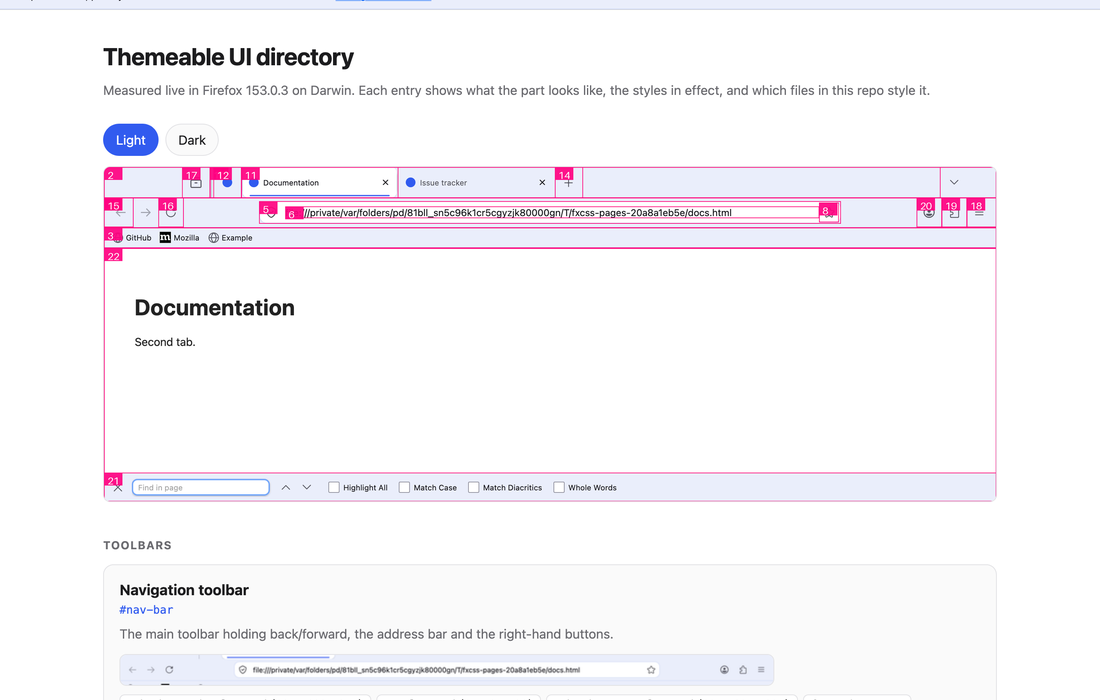
Everything is measured from a running browser rather than hardcoded, so it stays honest as Firefox changes — an element that no longer exists is reported as missing rather than quietly documented.
Add --self-contained to also get a single catalogue.html with the images
inlined, for attaching to an issue.
fxcss shot --out shots --url https://github.com/AdamXweb/WhiteSurFirefoxThemeMacOS
fxcss shot --out shots --only-live --url https://example.com --url https://news.ycombinator.com
Captures the theme against live sites, light and dark, for showing it off — README screenshots, release notes, an issue thread.
These land in <out>/live/ and are never part of a comparison. That is the
whole point of keeping them separate: someone else's page can change its
content, title or favicon between two runs, and a theme pull request should not
be blamed for it. compare only looks at PNGs at the top level, so they are
excluded by construction rather than by a rule someone has to remember.
Generate the release showcase workflow
with fxcss init --showcase to refresh these images when a release is published.
Start with doctor when a browser or theme does not behave as expected. This
section also covers installation alternatives, shell completion and the limits
of browser chrome capture.
fxcss doctorReports your Firefox version, whether userChrome.css is enabled, whether
context menus are themeable on your platform, how many stylesheets your theme
has — and every Gecko build installed on the machine, with versions. Start
here if something isn't behaving.
- Python 3.9+
- Firefox (any recent release; the toolkit finds it automatically on macOS,
Windows and Linux, or set
FIREFOX_BIN) - Pillow for
catalogue,compare,check,tweaksandupgrade --compare. Thefxcss[images]extra includes it; add it later withpipx inject fxcss pillow. Other commands use the Python standard library.
fxcss is on PyPI. Install it with pipx,
which gives it its own environment and puts fxcss on your PATH:
pipx install "fxcss[images]"No pipx yet? brew install pipx (macOS), sudo apt install pipx (Debian and
Ubuntu), or python3 -m pip install --user pipx elsewhere.
Why not plain pip? On current Homebrew, Debian and Ubuntu Pythons,
python3 -m pip installrefuses witherror: externally-managed-environment— that's PEP 668 protecting your system Python, not fxcss being broken. pipx is the intended answer for installing an application. pip still works fine inside a virtual environment:python3 -m venv ~/.venvs/fxcss && ~/.venvs/fxcss/bin/pip install "fxcss[images]"
For CI, or anywhere a surprise upgrade would be unwelcome, pin the release — the releases page has the latest. CI runners' Pythons are not externally managed, so plain pip is fine there:
pip install "fxcss[images]==0.22.1"Upgrade an existing pipx installation with pipx upgrade fxcss.
The new check command requires baselines with a complete capture coverage
report. To start using it with an older collection of screenshots, choose a
fresh baseline directory, then review the new images:
fxcss check --baseline .fxcss/baseline-0.22 --update-baselineSave that path as baseline in .fxcss.json for subsequent checks. Existing
directories not managed by check are preserved. Missing views and failed
browser states prevent a baseline update. You can still use compare directly
with older screenshots.
Theme repositories keep their generated workflows and pinned fxcss version
until you update those files. To pick up the capture fixes and workflow
improvements, regenerate the workflows with
your existing options and review the changes before committing them. The
generator skips existing files unless you pass --force; preserve any custom
workflow edits when reviewing the regenerated files.
eval "$(fxcss completions bash)"     # add to ~/.bashrc
eval "$(fxcss completions zsh)"      # add to ~/.zshrc
fxcss completions fish | source      # add to config.fish
Tab-completes subcommands, the flags each one takes, --firefox channel names
— and, reading the theme in front of it, the names of its optional stylesheets:
$ fxcss install ~/src/whitesur --with theme-mat<TAB>
theme-material-ocean  theme-material-palenight
Comma-separated lists complete element by element, and values already chosen
are not offered twice. The candidates are read off the real argument parser, so
a command or flag becomes completable the moment it exists rather than when
someone remembers to update a shell script. Completion never touches the
network: sheet names for a remote owner/repo are not known locally, and a Tab
that pauses to talk to GitHub would be worse than no completion at all — the
picker during install covers that case instead.
Firefox sets widget.macos.native-context-menus to true by default, which
means macOS draws right-click menus itself and CSS cannot style them at all.
menupopup and menuitem rules have no effect there. They do apply on Windows
and Linux.
fxcss doctor reports the setting for your platform, and
fxcss watch --native-menus=false switches Firefox to XUL menus so you can work
on that styling from a Mac.
Menus and the app menu are separate OS-level windows, so they appear in neither
a Marionette chrome screenshot nor a drawWindow rasterisation of the browser
window. Capturing the whole screen instead is worse: it depends on window
stacking and picks up whatever else is on your desktop. Every view shot
captures is therefore an in-document surface.
You can still look at popups in watch, and inspect them with the Browser
Toolbox. These separate popup windows cannot be captured. The standard
screenshot set does include the window-modal quit-confirmation dialog.
Marionette is plain TCP with length-prefixed JSON, so the client here is about a hundred lines of standard library. No geckodriver to keep in step with your Firefox version — a common source of CI breakage — and no dependency to install for the core commands.
More importantly, screenshots are taken in Marionette's chrome context, which captures the browser window's own document. An ordinary WebDriver screenshot only captures page content, so toolbars and tabs would never appear at all.
Screenshot comparison only works if an unchanged theme renders identically twice. The throwaway profile pins what would otherwise drift: first-run tours, telemetry prompts, update checks and animations are off; pages are local files rather than live sites; and Nimbus/Normandy are disabled so Mozilla can't switch a toolbar feature on remotely between two runs.
Two CSS rules hide artifacts of the harness itself — the robot icon Firefox shows in automated sessions, and the rollout-gated IP Protection button. Neither is part of your theme.
Each session also picks its own Marionette port. Firefox's fixed default of 2828 means a browser leaked by an earlier run would silently accept the next session's connection, which shows up as your theme mysteriously not applying.
| Command | What it's for |
|---|---|
new |
Start a theme from a small, working scaffold |
try |
Download a theme from GitHub and test-drive it |
install |
Install a theme into your real Firefox profile |
uninstall |
Remove managed files while preserving local changes |
upgrade |
Fetch a newer version of the theme you installed |
rollback |
Put the previous version back |
adopt |
Take over a theme installed some other way |
profiles |
List every Firefox profile and what is themed in it |
watch |
Edit CSS and see it live, no restart |
pick |
Click any part of the UI to get its CSS selector |
inspect |
Look up a selector you already have |
init |
Add PR previews and CI checks to your theme repo |
tweaks |
Screenshot every install option into a committable doc |
audit |
Check selectors and custom properties for compatibility findings |
changelog |
Diff two Firefox builds to see what chrome changed |
snapshot |
Record a Firefox's chrome names, to diff against later |
catalogue |
Build a directory of themeable UI parts |
shot / compare |
Screenshot and diff two versions |
check |
Run saved audit, capture and comparison settings with one combined report |
doctor |
Report what your Firefox supports |
completions |
Enable Bash, Zsh or Fish tab completion |
Issues and pull requests welcome — particularly landmark definitions for UI parts the catalogue doesn't cover yet, and reports of selectors that changed in a new Firefox release.
To work on fxcss itself, clone and install it in an editable environment:
git clone https://github.com/AdamXweb/fxcss.git
cd fxcss && python3 -m pip install -e ".[images]"
And if you would rather install nothing at all, the repo runs as-is:
python3 -m fxcss <command>The toolkit's own CI runs unit tests on Python 3.9, 3.12 and 3.14. Profile installation, upgrade, rollback, removal and failure recovery are checked on macOS, Windows and Linux, including edited files and paths with spaces and non-ASCII characters. Real Firefox checks cover Stable on all three platforms and ESR on Linux, repeated capture consistency, deliberate CSS changes, nested imports, content stylesheets and stacked optional stylesheets.
A separate compatibility workflow checks Stable, ESR, Beta and Nightly on Linux every Monday and Thursday, or on demand. Failed audits, incomplete captures and rendering differences fail the run; reports and screenshots are retained as workflow artifacts. These checks help detect browser changes between releases. To test a development branch before merging, manually run CI on that branch and enable compatibility to include all four channels. Normal PR CI runs Stable and ESR; the additional channels are optional for manual runs.
Package publishing is gated on CI and checks of the exact wheel and source
archive being published. Clean environments outside the checkout test the
base install, optional image dependencies, generated workflows and profile
compatibility with the latest released fxcss. Package checks run on all three
operating systems with Python 3.9 and 3.14; the release tag must also match the
built package version. These are fxcss's own checks; init generates the theme
repository workflows described above.
Run the checks locally with:
python3 -m unittest discover -s tests -v
python3 -m tests.smoke_themes       # requires Firefox and a display
python3 -m tests.smoke_variants     # requires Firefox and a display
python3 -m pip install build
python3 -m build
python3 scripts/package_smoke.py --dist dist # downloads the released package and image dependenciesfxcss was written with the assistance of Claude (Anthropic's Claude Opus 5), working alongside @AdamXweb. Every change was reviewed by a human before it landed.
Which commits are which is recorded in the history rather than asserted here:
| Author | |
|---|---|
adamXbot |
AI-assisted. Every one carries a Co-Authored-By: Claude trailer. |
AdamXweb |
Adam. |
Both halves of that are checkable:
git log --format='%an'                        # who authored each commit
git log --format='%b' | grep Co-Authored-By # which were AI-assistedBuilt while adding visual PR previews to WhiteSurFirefoxThemeMacOS, and generalised so it works for any userChrome theme.

![dependabot[bot]](https://avatars.githubusercontent.com/in/29110?v=4)