
English · 简体中文

Live demo (English) · 在线演示(简体中文)
Review, hand off, and manage specs with humans and agents — in one file.
Taco turns a specification directory into a portable review workspace. A human can open one .taco.html file in a browser, read the complete spec, edit the original Markdown, and leave anchored comments. An agent can then import those edits and comments back into the canonical files, handle the feedback, and produce the next review copy.
The file is the handoff. It carries the spec, its directory structure, the reader, the editor, and comments. The recipient needs a browser—not a Taco account, hosted workspace, or proprietary requirements database.
Taco is built with gratitude to Bento, the office suite that fits in a file. Bento showed that a complete creative workspace could travel as one portable document; Taco carries that idea into specification review.
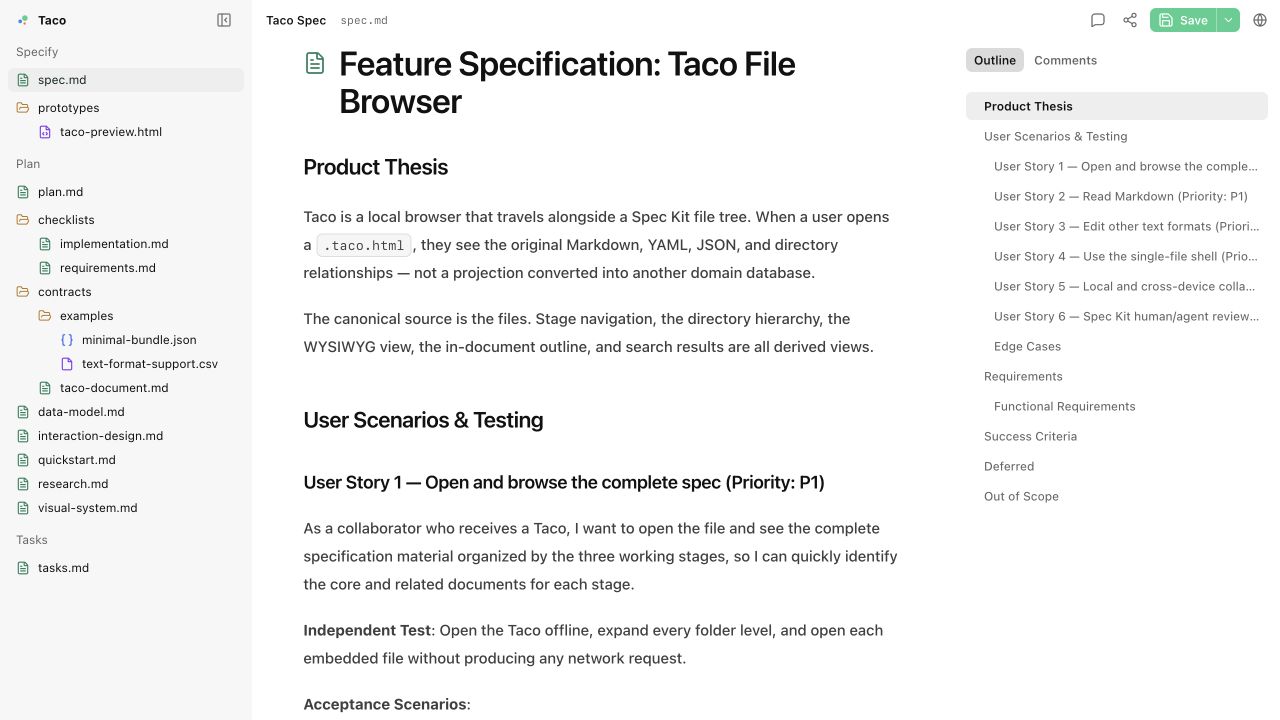
Taco includes lightweight support for Spec Kit's directory conventions and is designed for specification-driven development (SDD). It does not require one methodology: its underlying model remains a Markdown file browser and review surface that supports design documents and other directory structures. An Agent can organize Markdown and directories around a team's process, then package that structure as a Taco.
canonical spec directory → one .taco.html → human review → agent sync → canonical spec directory
- Review together: Humans get a readable interface for editing and anchored comments; agents get structured files and complete review threads.
- Hand off without setup: Send one HTML file that opens locally in a modern browser and keeps working offline.
- Manage the real spec: Markdown files remain canonical, diffable, and usable by existing repositories, agents, and command-line tools.
Point your Agent at this repository:
Install Taco in this repository and make Taco the default review flow
for future specs. Follow the installation instructions in the Taco repository:
https://github.com/Arcadia822/taco
The Agent reads Taco's repository instructions and installs the complete skills/taco/ directory (agent guide, production shell, optional references and reader script, and document examples) into its skill location — preferably with npx skills@latest add arcadia822/taco --skill=taco, falling back to copying the directory. That is the whole installation: from then on the Agent assembles .taco.html review files from the skill's own shell in any directory, fully offline, with no npm package, no CLI, and no build. The installed skill also compares its own VERSION with the newest release once per work session and, when something newer is published, closes its reply with one sentence telling you so — it never upgrades anything on its own. Optional deeper integrations — Spec Kit extension commands/hooks/policy for project-level wiring, or taco-cli for cloud publishing (TacoHub/Tacobin) — are separate, explicitly requested steps described in docs/agent-installation.md.
Checkpoint use follows the user's and project's review requirements. The bundled spec/ SDD graph is an example to adapt, not a default stage plan or a required destination for generated Taco files. Agents load its detailed protocol reference only when working with Checkpoints; a normal review does not need one.
After installation, the review loop needs no further setup:
flowchart LR
A["Document directory<br/>canonical source"] --> B["Agent assembles one<br/><dir>.taco.html<br/>from the skill shell"]
B --> C["Agent opens it<br/>in the browser"]
C --> D["Human reviews,<br/>edits, and comments"]
D --> E["Human uses Handoff<br/>or saves the file"]
E --> F["Agent applies edits<br/>and comments to<br/>canonical files"]
F --> G["Agent refreshes the<br/>same Taco and reopens it"]
G --> D
The Agent copies the skill's shell, writes the document into its data block, and leaves every other file in the directory untouched. Because the Taco carries its own docId, comment threads, and sidebar navigation, each refresh preserves them: the next reviewer reopens the same document with their threads intact.
An installation that also wires Taco into a Spec Kit project is a separate, explicitly requested step; the optional extension adds commands, hooks, and project policy but no longer sits on the default path.
Specifications should not be locked inside an account, a server-side workspace, or a proprietary data model. The project follows these boundaries:
- Files are the canonical source.
- A Taco can be opened offline, copied, archived, and shared.
- Markdown remains readable and diffable, and existing agents and command-line tools can continue to process it.
- Both the interface and the transport format can be inspected, modified, and rebuilt.
- Files Taco does not understand remain intact instead of being silently discarded.
The project is licensed under the MIT License. You can study the implementation, change the interaction model, embed your own specification directory, or adapt the single-file container for other local document workflows.
- Package a complete specification directory into one portable
.taco.htmlfile that opens in a browser and works offline. - Browse, search, and edit the canonical Markdown and text files while preserving their real directory structure. Standalone JSON/YAML have syntax-highlighted source editors; Mermaid diagrams have an editable source and preview.
- Review specs with anchored comment threads, including in-place editing of your own messages and tombstone deletion of individual messages without removing their replies; then save an updated Taco or write the changes back to the original directory.
- Track document readiness with optional Checkpoints. Renaming or deleting a required file leaves its original Checkpoint path visible as uncreated rather than silently rewriting the requirement.
- Choose the self-contained Complete shell for offline review or the smaller Lite shell for connected review, with editable Markdown source fallback when Lite's CDN editor is unavailable.
- Integrate with Spec Kit, optionally and on explicit request, to keep each feature's Taco current and safely import human edits and comments with conflict detection.
The Quickstart above is the user-facing entry point. docs/agent-installation.md is the machine-facing installation and review guide for the Agent acting on the user's behalf. Contributor instructions for Agents working in this repository remain in AGENTS.md.
Agent requirements:
- Keep the reviewed directory canonical. The
.taco.htmlis a transport: copy the skill'staco-shell.html, then write thetaco/filesv1 bundle JSON into its#taco-documentblock, preservingdocId, comments, navigation, and any Checkpoint graph and statuses across refreshes. Only that data block and the escaped HTML<title>are agent-writable; never hand-edit the rest of the shell. - Open the generated file in the user's browser whenever the host permits local
file://navigation, and report which ofpresented as a clickable file,opened, oropened and verifiedactually happened. A headless load is internal evidence and is never reported as user-visible presentation. - Take the review back through either channel: the browser's Handoff action, or the reviewer's saved
.taco.html. Handoff copies the text diff since the last save plus the open comment threads, and does not require saving; the saved-file channel does. If neither arrived, say so instead of importing content you never received. - Preserve all existing bundle fields on every refresh, including
checkpointswhen present; never fabricate a comment, a hash, or a verification claim; never delete a canonical file because it is absent from the bundle. - Treat a live collaboration-enabled Taco as potentially credential-bearing. Do not upload or paste its contents into another service without the user's approval.
The plugin lives in extensions/taco/ and is implemented as a local Spec Kit extension. It is optional and explicitly requested: it adds project-level wiring — two agent commands, lifecycle hooks, an offline CLI, and a persistent project policy — to one initialized Spec Kit project. The skill installation above is complete without it, and the skill workflow never needs it.
Installing the extension adds Taco's complete project-local runtime to that one project. Required lifecycle hooks run speckit.taco.update after Spec Kit operations that create or modify feature artifacts. The command packages the complete feature directory as <feature>/<feature>.taco.html; every refresh targets that same file and preserves its comments. After a human edits or comments in Taco, ask the Agent to use the browser's Handoff, or have them save the file and use:
speckit.taco.review specs/001-example/001-example.taco.html
review reports conflicts instead of overwriting them. It resolves every changed path against the reviewed root and rejects absolute paths, .., backslashes, and anything that escapes the feature directory. It then compares the received content with the content the reviewer actually reviewed — the packed baseline, using sourceHash when the bundle carries one — and if the canonical file changed since packaging, or a diff does not apply cleanly, it reports that specific conflict with the diff rather than writing. Agent-facing installation and CLI details live in extensions/taco/README.md.
The stricter all-or-nothing rule belongs to the extension's optional sync CLI utility: it records a SHA-256 baseline for every packed file and refuses every write when both the canonical file and the Taco copy changed since packaging. Neither behavior is applied automatically on the skill's offline path — when a review arrives through Handoff or a saved file with no CLI in the loop, the Agent performs the same comparison itself and stops on any change it cannot attribute.
The packer includes visible UTF-8 regular files plus validated local PNG assets up to 10 MiB. PNGs are embedded for offline Markdown rendering and preserved as binary data during review round trips. Its only default exclusions are *.taco.html and hidden paths; repeatable --ignore parameters add explicit feature-relative exclusions. Ordinary .html and .htm source files are unsupported and cause a clear packaging error unless explicitly ignored; the .taco.html product container remains supported.
After each successful update, the Agent presents the exact generated Taco as a native clickable local file, and opens it in the user's browser whenever the host permits local HTML navigation. In Codex, the user click opens it in Browser; the Agent does not attempt autonomous file:// navigation. A headless boot check is internal evidence and is never reported as user-visible presentation.
src/                                  Browser, editor, comments, and save runtime
skills/taco/                          Installable Taco skill: guide, shell, routed references, script, and examples
extensions/taco/                      Optional Spec Kit manifest, agent commands, offline CLI, and project policy
examples/checkpoint-scroll/           Standalone dense Checkpoint demo; not a shipped template
tests/                                Data model, rendering, interaction, and CLI round-trip tests
specs/001-taco-bento-product/         Default Taco content and product specification
specs/002-taco-speckit-plugin/        Installable Spec Kit plugin specification and acceptance flow
docs/agent-installation.md            Agent installation and review workflow
AGENTS.md                             Instructions for Agents contributing in this repository
CONTRIBUTING.md                       Contributor development and validation guide
vite.config.ts                        Default bundle injection and build configuration
The default specification directory is also the project's executable example. Its README.md mirrors this project README; product behavior is in spec.md, technical design in plan.md, task state in tasks.md, and the container protocol in contracts/taco-document.md. None of these names controls the initial document or sidebar category.
Without a navigation manifest, first-level directories form Categories and root files appear under Unassigned; no filename or Spec Kit path has a special route. A manifest explicitly groups virtual files and sets an optional entry document without changing file paths or synchronizing a category change to disk. Files not listed in the manifest remain Unassigned. Reviewers can assign files through the document header's Category control, manage ordinary groups, and set an entry document in the sidebar. Drag-and-drop movement is not supported; a new file created from Unassigned defaults to Unassigned.
Classification is a Taco capability rather than a document property: no frontmatter key routes a file, and the deprecated taco_scope property is no longer read. Taco presents all leading YAML frontmatter as an Obsidian-style property editor while preserving it in canonical Markdown. New specs store their title in YAML and begin the body at H2 instead of repeating the title as H1. See AGENTS.md for the complete convention.
- Files first: File content is the only source of truth.
- Portable by default: Complete works offline; Lite keeps source editing available when network libraries fail.
- Derived UI: Stages, directories, the outline, and the search index must not become a second persistent state.
- Graceful degradation: Unknown formats show their source without guessed business semantics.
- No invisible rewrite: Rendered output must never reformat or replace canonical Markdown.
- Honest scope: Taco files provide local review and handoff, not real-time cross-device collaboration.
Issues and pull requests are welcome. See CONTRIBUTING.md for the complete development workflow, test expectations, and generated-artifact policy. Before submitting a change, run at least:
npm run checkUseful contribution areas include accessibility, editing, offline text renderers, cross-browser verification, performance, import and export, and protocol audits.
Taco is currently a prototype. File browsing, Markdown editing, YAML frontmatter properties, standalone YAML/JSON source editing with syntax highlighting, Mermaid diagrams, Categories, Checkpoints, comments, and single-file saving are implemented. When the initial file is a Mermaid diagram, the startup splash remains visible until its first preview renders or reports an error. The Complete shell supports offline review; Lite loads pinned editor libraries from public CDNs and keeps Markdown source writable when they fail. Real-time collaboration, version history, accounts, and SSO are not implemented.
Taco v0.3 is a testable prototype, not a production-stability commitment.
The specification-directory and artifact conventions were inspired by GitHub Spec Kit.
Taco is licensed under the MIT License. See LICENSE for the complete text and THIRD_PARTY_NOTICES.md for third-party attribution.

![github-actions[bot]](https://avatars.githubusercontent.com/in/15368?v=4)