This repository houses the code used to light an single colour LED tape connected to a Raspberry Pi via a REST API.
Below is an image of the electronics and connectivity required to connect the Raspberry Pi to an LED tape. The required parts for this project are:
- A single colour 3526 SMD LED tape.
- A TIP3055 NPN transistor
- A 12V 5A DC adapter
- A Raspberry Pi with Python (tested with 2.7) and pigpio installed
Connect the components like this:
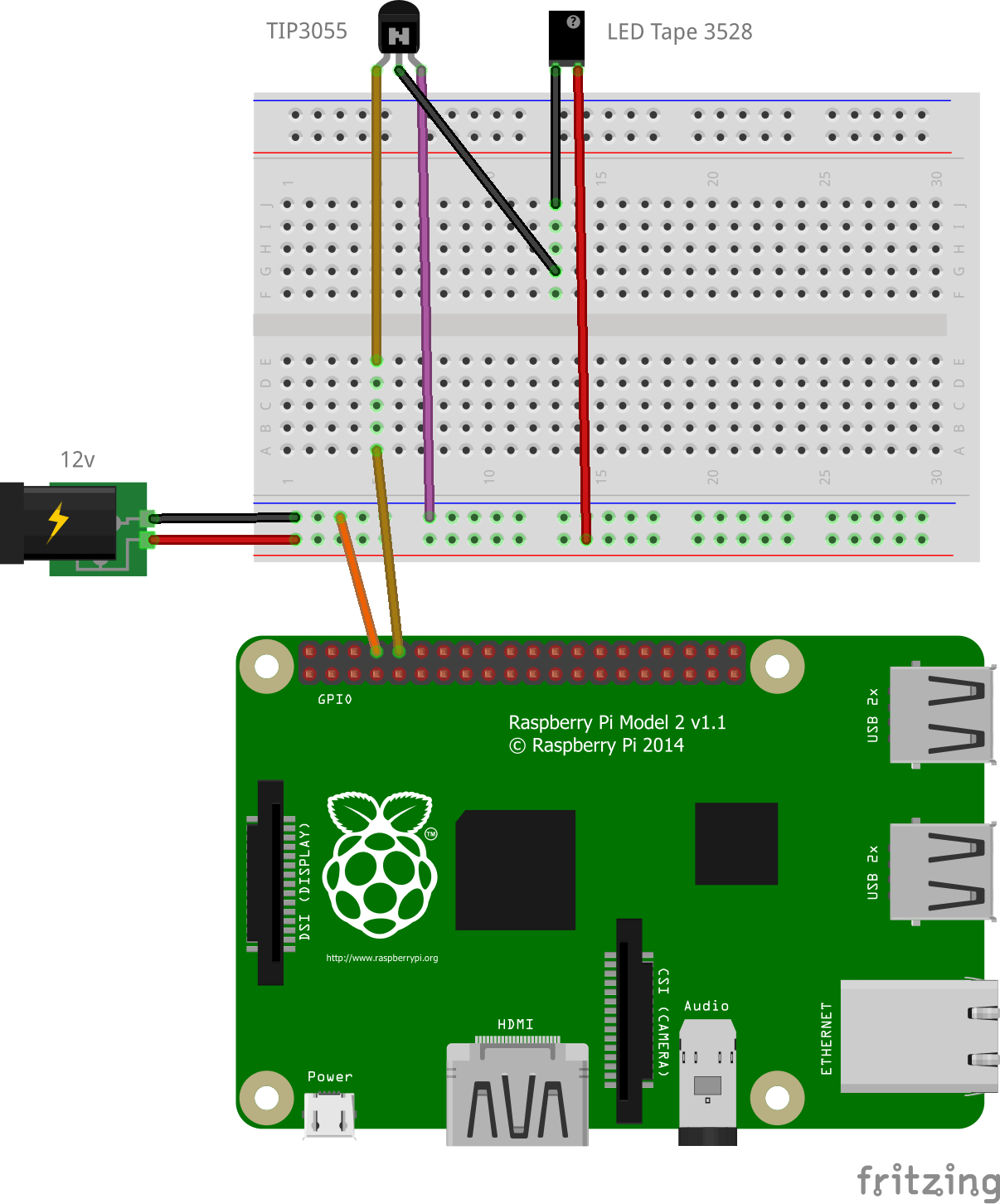
To run the application you must first start the pigpio daemon, then the Python app:
~ $ cd led_tape
~/led_tape $ sudo pigpiod
~/led_tape $ sudo python app.py <gpio_pin>
By default the app listens on port 5000. The syntax for changing the brightness is <ip>/set/<gpio_pin>/<brightness_percentage>, where '<gpio_pin>' matches GPIO port the orange wire is attached to in the image above. In the case of the image, this is 14.
You can either access the link via your web browser, or on the command line using a tool like cURL:
$ curl localhost:5000/set/14/50
The above example will set an LED tape attached to GPIO port 14 to 50% brightness.
