- A working PostgreSQL installation.
- SQL Study
By the end of this talk, developers should be able to:
- Create a database table
- Insert a row or rows into a database table
- Retrieve a row or rows from a database table
- Modify a database table after creation
- Update a row or rows in a database table
- Delete a row or rows from a database table
- Fork and clone this repository. FAQ
- Create a new branch,
training, for your work. - Checkout to the
trainingbranch. - Install dependencies.
Please remember that demonstrations are for taking notes, code alongs are to write code following the consultant's lead, and labs are to write code with the support of the consulting team.
Why are we talking about SQL?
Most applications need a data store to persist important information. A relational database is the most common datastore for a web application. SQL is the language of relational databases.
At it's simplest, a relational database is a mechanism to store and retrieve data in a tabular form.
Spreadsheets are a good analogy. Individual sheets as tables and the whole spreadsheet as a database. See this link for an example.
Why is this important?
Database tables are a good place to store key/value pairs, as long as the values are simple types (e.g. string, number). The keys are the column names and the values are stored in each row. That maps well to simple JSON objects. A group of rows from one table maps well to a JSON array.
What about more complicated data?
Database tables can reference other tables which allows arbitrary nesting of groups of simple types. This is something we'll be looking at more closely later.
Relational Database Management System (RDBMS)
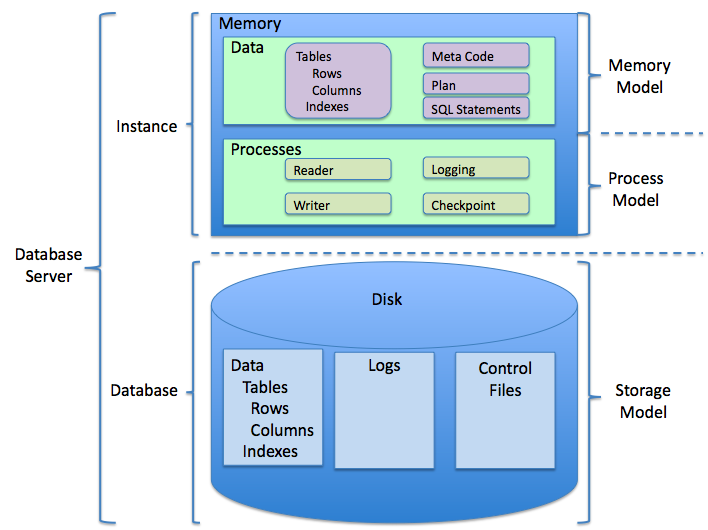
A Database Server is a set of processes and files that manage the databases that store the tables. Sticking with our previous analogy a database server would map to Google Sheets.
CRUD (create, read, update and delete), SQL, HTTP, and Rails Controller action.
| CRUD | SQL | HTTP | action |
|---|---|---|---|
| Create | INSERT | POST | create |
| Read | SELECT | GET | index/show |
| Update | UPDATE | PATCH | update |
| Delete | DELETE | DELETE | destroy |
We'll be using PostgreSQL, a popular open source database server, which should already be installed on your computer.
On Macs you can run brew services list to see if PostgreSQL is running.
If the server isn't running, status not started, please start it using brew services start postgresql.
We'll use sql-crud as the database to hold our tables and
psql to
interact with it. psql is PostgreSQL's command line client which lets us
execute SQL commands interactively (REPL-like) and from scripts. It also has
some built in commands we'll find useful.
$ psql sql-crud
psql: FATAL:  database "sql-crud" does not exist
$
But first we need to create the database. We'll use the CREATE
DATABASE
command from within psql. This is a
SQL (Structure
Query Language - see also the Wikipedia article)
command and requires that we wrap the database name in double quotes (i.e.
create database "sql-crud";). A - is not allowed as a name character in SQL
unless the name is surrounded with double-quotes.
If we want to remove a database - be careful, this is unrecoverable - we use the DROP DATABASE command.
If we run psql without a parameter it will connect to our default database,
usually named with our login.
psql (9.6.1)
Type "help" for help.
and=> CREATE DATABASE "sql-crud";
CREATE DATABASE
and=>Once we've created the database we can access it using the psql built-in command
\c (for connect):
and=> \c sql-crud
You are now connected to database "sql-crud" as user "and".
sql-crud=>
Or we can access it from the command line using the psql command and passing
the database name as an argument:
psql sql-crudpsql (9.6.1)
Type "help" for help.
sql-crud=>psql has help for both its built-in commands and for SQL.
psql (9.6.1)
Type "help" for help.

sql-crud=> help
You are using psql, the command-line interface to PostgreSQL.
Type: \copyright for distribution terms
\h for help with SQL commands
\? for help with psql commands
\g or terminate with semicolon to execute query
\q to quit
sql-crud=>Let's look at some of the help for psql commands.
\llists all the databases created on the server we're connected to.\d(and its variations) shows information about the objects in the current database.\ireads commands from a file
Now let's make sure we're in the right database:
sql-crud=> select current_catalog;
 current_database
------------------
 sql-crud
(1 row)

sql-crud=>
We'll run all our SQL commands against the same database, so it's important that
we consistently use sql-crud.
We create a table to define the names and types of data we want to store.
PostgreSQL's documentation is extensive and excellent, and we'll want to make use of it throughout the lesson.
- Table basics - a brief overview of tables in an RDBMS.
- Data Types - the data types available in PostgreSQL.
- CREATE TABLE
- detailed documentation of PostgreSQL's version of the SQL
CREATE TABLEcommand. - DROP TABLE
- detailed documentation of PostgreSQL's version of the SQL
DROP TABLEcommand.
Note well, DROP TABLE is unrecoverable if it executes successfully.
By convention (the one we'll use throughout), tables are named with the
pluralization of the name of the object whose data they hold. So for example, if
each row of data is about a person, then the table is called people. By another
convention, each table will have an id column that uniquely identifies each
row. This unique id is the PRIMARY KEY of the table.
We'll create a table to hold books. We'll use the first line of data/books.csv
for the column names.
What data-types should we use for each column?
We'll save the SQL statement to create the books table in
scripts/library/create_table_books.sql. We can execute the commands in the
file using psql --file=filename <file> or from the psql prompt using \i <file>.
Together, we'll create a table to hold information about patients. We'll use the
first row of data/people.csv for the column names.
What data-types should we use for each column?
We'll save the statement in scripts/clinic/000_create_table_patients.sql
Create a table to hold information about ingredients. Use the first row of
data/ingredients.csv for the names of the columns other than id. Use
scripts/cookbook/000_create_table_ingredients.sql to store the SQL statement.
Once you've created the table ingredients, create the table books from the
demonstration.
- Inserting Data - overview of adding rows to a table.
- INSERT
- detailed documentation of PostgreSQL's version of the SQL
INSERT INTOcommand. - COPY
- detailed documentation of PostgreSQL's
COPYcommand for loading data in bulk.
For inserting bulk data, PostgreSQL provides the COPY command. We won't use
that command directly, as it executes relative to the server installation,
rather we'll use psql's meta-command \copy allowing us to load data relative
to where we run psql. Bulk loading is something available with most RDBMSs,
but the specific commands and capabilities vary.
First we'll use variations of INSERT to add a few rows to books. We'll store
the the commands in scripts/library/010_insert_into_books.sql.
Note that string literals in SQL statements are delimited by single quotes, i.e.
'. To include a single quote in a string literal, double it, e.g. 'That''s interesting'. This is not an issue when loading from a valid CSV file using
PostgreSQL's COPY command or psql's \copy command.
Next we'll load data in bulk from data/books.csv using \copy. We'll store
that command in scripts/library/020_bulk_load_books.psql
Together we'll add a few rows to patients then we'll bulk load
data/people.csv.
Add an ingredient to the ingredients table using INSERT then bulk load
data/ingredients.csv.
Next add a book to the books table using INSERT, then bulk load
data/books.csv.
This is about the query part of Structured Query Language. Query statements can run from almost trivial to highly complex. They provide a mechanism to retrieve and summarize the data in your database.
- Queries - TOC
of the Queries section of PostgreSQL's documentation for
The SQL Language. - SELECT -
detailed documentation of PostgreSQL's version of the SQL
SELECTcommand.
Let's see some what we can learn about the books in the database.
Together we'll build a query to get the count of patients by gender.
Write a query to get the count of ingredients by unit.
Then write a query to count books by author.
- Modifying Tables - overview of changing tables.
- ALTER TABLE
- detailed documentation of PostgreSQL's version of the SQL
ALTER TABLEcommand.
We'll add the column isbn to books.
We'll change the type of the columns height and weight in patients.
Add columns for macro-nutrients to ingredients then add the column isbn to
books.
- Updating Data - overview of changing rows
- UPDATE -
detailed documentation of PostgreSQL's version of the SQL
UPDATEcommand.
We'll update the isbn for some books.
Let's update some patients' weights.
Update macro-nutrients for some ingredients then isbn for some books.
- Deleting Data - overview of removing rows from a table
- DELETE -
detailed documentation of PostgreSQL's version of the SQL
DELETEcommand. - TRUNCATE -
detailed documentation of PostgreSQL's
TRUNCATEcommand.
We'll remove a few books from the database.
Note, TRUNCATE <table name>; is functionally equivalent to DELETE FROM <table name>;, it will remove all the rows from the table.
Let's remove the patients who's given and family names start with the same letter.
Remove ingredients you wouldn't keep in your kitchen or pantry.
- All content is licensed under a CCBYNCSA 4.0 license.
- All software code is licensed under GNU GPLv3. For commercial use or alternative licensing, please contact [email protected].