An Anki add-on that adds more features to the card browser.

Feature notice: The note browser mode (show a single card per note) has been moved to a separate add-on maintained by another developer (@Arthur-Milchior). If you rely on this feature, please download it from the following links:
- AnkiWeb: Browser have one line by note
- GitHub: anki-browser-for-note
Advanced Browser is an Anki add-on that allows you to add a variety of new, sortable columns to the card browser. These columns range from:
- Fields from your note types
- Additional statistics about the cards
- Internal database values (if you're a developer; off by default)
Right click on any of the currently visible columns and a menu will appear. Some new menu items will now appear in the list.
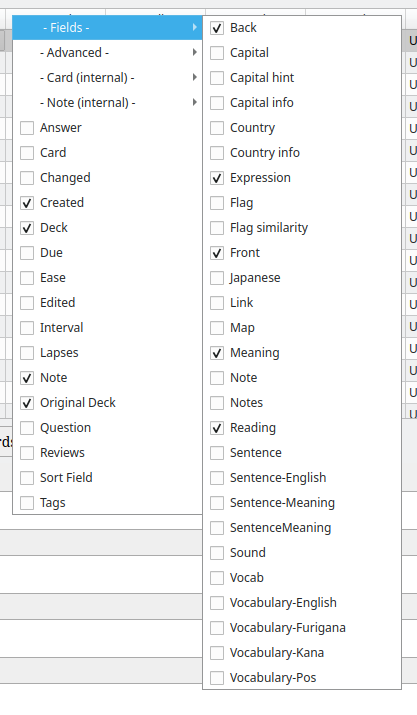
- The - Fields - menu item contains a list of your note types. Each note type reveals a sub-menu with each of its fields that can be enabled as columns. If a field name exists in another note type, it will be enable as well, and sorting by this column will consider all of the note types together as one.
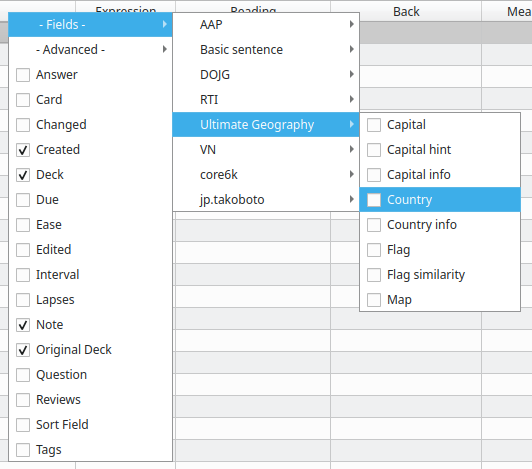
If you prefer to see every field in a single list instead of grouping fields by note type, you can toggle the behaviour by editing the configuration item Use a single list for fields using Anki's add-on manager and setting it to true:
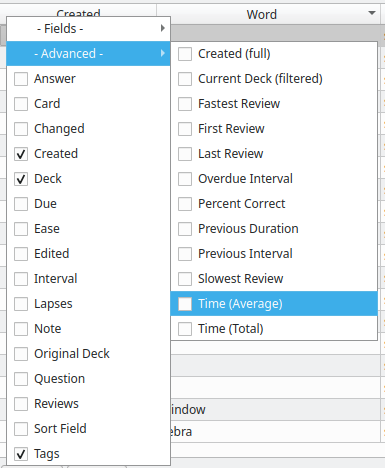
- The - Advanced - menu item offers some columns with interesting statistics about each card.
By setting "Table content is selectable" to true, you'll be able to select table content by double clicking on it. This way, you can copy it. Note that editing the content has no effect.
You can edit the content of some elements of the tables. You need to activate this feature in the configuration before being able to use it, because it may be dangerous if you don't really know what you're doing. Please see the document [edition in table](edition in table.md) to see what editing each column does.
You can also show some fields used internally by Anki but probably aren't very useful for the typical user. These are disabled by default, but you can enable them by going to Tools -> Add-ons -> advanced_browser -> Edit... and uncommenting the line that loads the extension that offers those fields.


If you have a good idea for a new column, please open a new issue on GitHub and I will likely include it. If you are a developer and would like to add it yourself, please see custom_fields.py as it's the most likely place you'd want to put it. Contributions are more than welcome!
If you are an add-on author and would like to add a new column in your own add-on, then doing so is easy through Advanced Browser.
Advanced Browser is designed to let add-ons add their own columns through a standard Anki hook. In fact, Advanced Browser uses this same hook to offer its own columns, so you already have a working example to look at. Your own add-on can easily add its own columns provided your user also has Advanced Browser installed.