A modal terminal UI for reviewing GitHub pull requests and GitLab merge requests, for people who are most comfortable in the terminal with Vim motions and a command line.
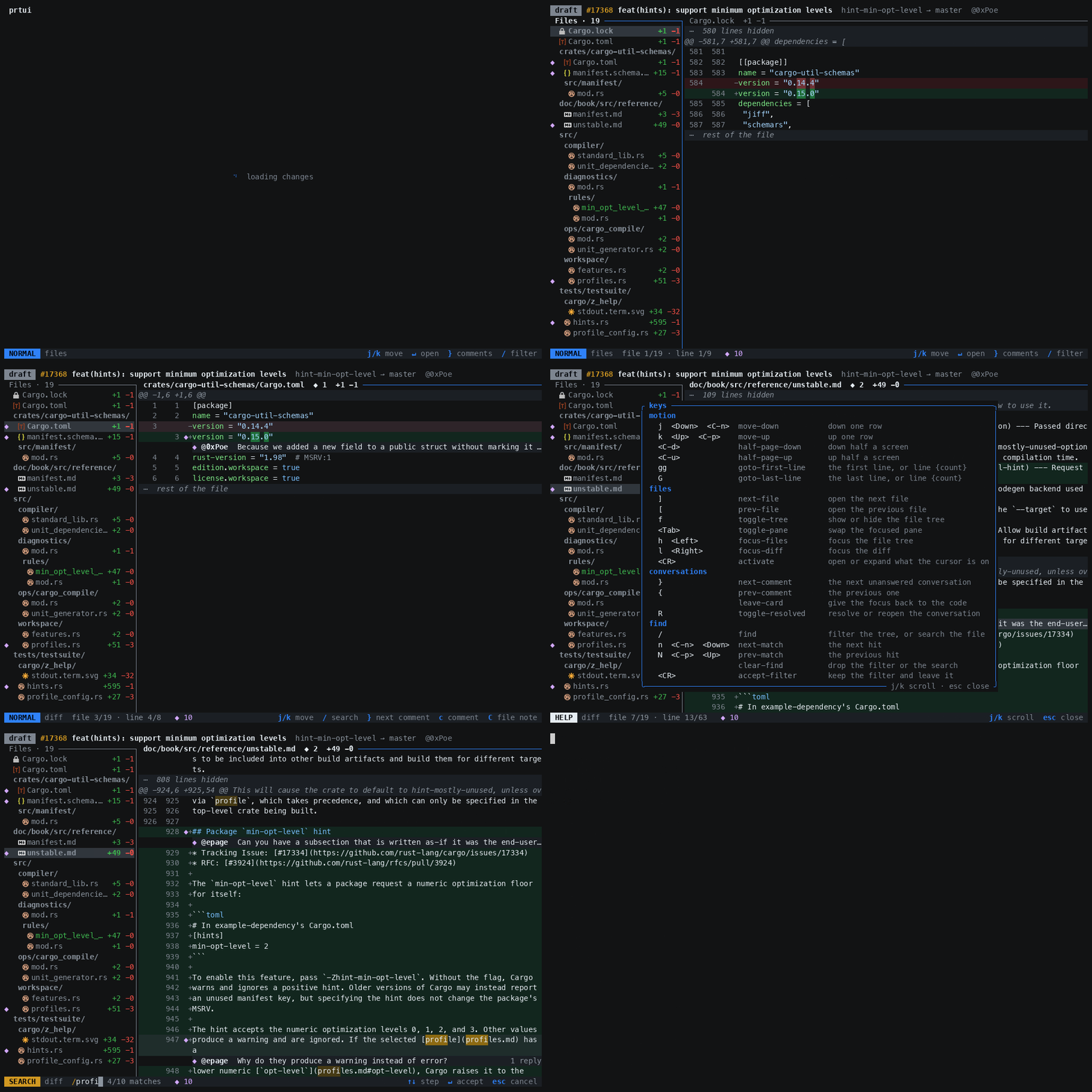
Run prtui inside a GitHub or GitLab repository to choose one of its open pull requests,
or outside a Git repository to choose from your open pull requests. The
full-screen selector shows each pull request's current review decision, and
K summarizes the one under the cursor without opening it. A number opens that
pull request directly:
prtui 123
prtui -R owner/repo 123
prtui -R owner/repo
Review uncommitted changes from anywhere inside a Git working tree:
prtui diff
prtui diff --theme light
This shows staged and unstaged changes together against HEAD, plus untracked
files. Ignored files are excluded. Two columns in the file tree show staging:
S for staged, U for unstaged, SU for both, and ? for untracked.
The status bar shows the selected file’s full staging status; ? opens the
marker legend in help. Files whose staged and unstaged changes
cancel out remain listed, with an explanation in the diff pane.
Navigation, search, syntax highlighting, and context expansion are available; review comments and browser links are not. The view is a snapshot; rerun the command to pick up further edits. Local diffs require Git but no account or provider CLI authentication.
Install Git and prtui, then set up the CLI for the host you use: GitHub
CLI (gh) or GitLab CLI (glab). Only that provider’s CLI needs
to be on your PATH. Local diffs need neither CLI.
Homebrew
brew install tale/tap/prtuimise use -g github:tale/prtui@latestCargo
cargo install prtuiNix
nix run github:tale/prtui -- 1234Prebuilt binaries for macOS and Linux, on arm64 and x86_64, are attached to
releases with SHA-256 checksums. Choose a linux-musl archive for
Linux; these binaries do not require a particular glibc version. The older
linux-gnu archives require glibc 2.35 or newer.
Install script for macOS and Linux:
sh -c "$(curl -fsSL https://raw.githubusercontent.com/tale/prtui/main/install.sh)" --The script downloads the latest release, verifies its SHA-256 checksum, and
installs prtui into ~/.local/bin. Add that directory to your PATH if needed.
It requires curl, tar, and either sha256sum or shasum.
To install the latest main build:
sh -c "$(curl -fsSL https://raw.githubusercontent.com/tale/prtui/main/install.sh)" -- --headUse --version VERSION to pin a release and --install-dir DIR to choose
its destination. Main builds update the head prerelease; tagged releases
remain the default.
Install Git and authenticate gh or glab separately as described below.
To uninstall, remove the installed prtui binary.
Install gh (brew install gh on macOS), then authenticate:
gh auth login
prtui 1234
From inside a checkout, the repo is determined based on the git remote of the
current working directory. You can also override it with -R like below:
prtui 1234 -R rust-lang/cargoGitHub Enterprise works through the same flag, with the host in front:
gh auth login --hostname github.example.com
prtui 1234 -R github.example.com/team/service
Each host needs its own gh login; prtui uses the token for the host it is
reviewing and never sends one host's credential to another.
Install glab (brew install glab on macOS), then authenticate to the host
that owns your repository:
glab auth login --hostname gitlab.com
cd /path/to/checkout
prtui 123
For self-hosted GitLab, include the hostname when logging in and selecting a repository. Nested groups are supported:
glab auth login --hostname gitlab.example.com
prtui --provider gitlab -R gitlab.example.com/group/subgroup/project 123
Use a personal access token with the api scope when prompted for a token.
The account also needs permission to access and review the project. Verify the
login with glab auth status --hostname gitlab.example.com.
Omit the number to choose an open merge request. Outside a checkout, list your
GitLab merge requests with prtui --provider gitlab; for a self-hosted account,
use GITLAB_HOST=gitlab.example.com prtui --provider gitlab.
Each host needs its own login. prtui reads credentials from the selected
provider’s CLI for that host. A permission error can mean the token lacks
access to the project; check the CLI login and the repository passed to -R.
Provider selection uses --provider first, then the saved host mapping, then
known hosts and concurrent provider probes with a two-second timeout. GitHub
is the fallback when detection is inconclusive. Use --provider gitlab if a
self-hosted instance is not detected. An override applies to the current run.
Positive detections are saved in $XDG_CONFIG_HOME/prtui/hosts.json, or
~/.config/prtui/hosts.json when XDG_CONFIG_HOME is unset. Inconclusive
fallbacks are not saved. Edit or remove a host entry to correct or refresh it:
{
  "github.example.com": "github"
}
Local discovery prefers origin, then other network remotes. Use -R to
select a different repository.
Options:
  -R, --repo <[HOST/]NAMESPACE/REPO>  Select another repository
      --provider <github|gitlab>  Override provider detection
      --theme <auto|dark|light>   Color theme [default: auto]
  -h, --help                      Print help
  -V, --version                   Print version
Press ? for the same list in the app, or : for a command line. Every key
below is a named command, so anything bound to a key is also reachable as
:name — and :42 jumps to line 42.
The selector — the list prtui opens on takes the same motions as the
rest of the app: j/k, <C-d>/<C-u>, gg/G, and a count like 12G.
/ narrows the list as you type, over titles and repositories: <CR> keeps
the narrowing, esc puts back the list and the row you opened it on. K opens
an overview of the pull request under the cursor: its review and check summary,
description, and one collapsed row per discussion comment. Move onto a fold
and use <CR> or za to open it. <CR> anywhere else opens the review, and
gx opens the pull request in a browser.
The pull request — K opens the same overview over the panes, using the
description and discussion already kept current by the review. ? opens the
key reference. Both panels have a highlighted row cursor, take the same
motions as the rest of the app, and close with esc; / searches them here.
Motion — j/k a row, <C-d>/<C-u> half a screen, gg/G the first
and last line. A count works where you would expect: 10j.
Files — ]/[ step through files, f shows or hides the tree, <Tab>
swaps the focused pane, h/l move between them, <CR> opens what the cursor
is on. The pane holding the keys is the one wearing its title in the accent
colour, and the only one drawing a cursor bar: the other keeps the open file in
bold and nothing else. x marks the open file as read — the same mark GitHub
shows as viewed — and opens the next file you have not read, stepping over the
ones you have. The file it left wears a tick in place of its icon. Pressing x
again on a marked file clears the mark and stays there. GitLab does not persist
viewed-file marks.
Every jump between files treats the tree as a ring. Step off the last file and you are on the first, and the bar says it wrapped, so a review opened in the middle never hides what is above the cursor.
Reading — / searches whatever you are reading: an open panel, the tree,
or the file, and starts clean each time. n/N walk the hits and :noh
clears them. Inside / or : the arrows step what is under it and
<C-p>/<C-n> recall what you typed there before. za reveals the
hidden lines under the cursor, zj/zk reveal downward or upward, and zR
opens every gap in the file — the surrounding code is fetched from the host on
demand.
Prompts — every prompt edits with readline, the same chords bash and
zsh answer to. /, :, a comment, and the submit form are all lines of text in
a terminal, so they edit the way a terminal prompt does. <C-a>/<C-e> go to
the ends of the line, <C-b>/<C-f> move a character, <A-b>/<A-f> a word —
a word being a run of letters and digits, the way readline counts one. <C-d>
rubs out the character ahead, <A-BS> the word behind it and <A-d> the word
ahead, <C-u>/<C-k> everything behind or ahead on the line. <C-w> is
delimited by whitespace alone, as it is in the shell, so one press takes back a
whole path rather than the last name in it. In a comment, which is the one
prompt with more than one line, every one of these stays on the line the cursor
is on.
Readline rather than Vim, where the two disagree: Vim's own command line spells
<C-b> as the start of the line, and gives <C-a> and <C-f> to two things
prtui has no equivalent of. <C-e>, <C-w>, and <C-u> mean the same in both.
There is no kill ring behind the four rubouts, so <C-y> puts nothing back.
Conversations — }/{ jump between unanswered threads, crossing into the
next file with one once the open file runs out, and R resolves or reopens the
one you are on.
Comments — c comments on the line, on a visual span, or replies to the
thread under the cursor. v selects lines first; C writes a note about the
whole file. e reopens a draft, d discards it.
Links — y copies a permalink to whatever the cursor is on: the line, the
visual span, or the conversation. The copy goes through the terminal itself, so
it works over SSH. gx opens the pull request in a browser.
Submitting — s opens the form. <Tab> steps the verdict between
comment, approve, and request changes; <CR> ships every draft as one review.
When a review was opened from the dashboard, q or :q returns to the same
row and a second q quits. When a review was opened directly by number, q
quits immediately. <C-c> always quits. <Esc> backs out of whatever you are
inside — a conversation, then a live query — but never out of the app.
CI runs formatting, Clippy (pedantic, nursery, and cargo lints, warnings denied) and the test suite. Reproduce all three locally:
cargo fmt --all
cargo clippy --all-targets --all-features -- -D warnings
cargo test --all-features
With mise installed, mise run check does the same and mise install
sets up the pre-commit hook that formats and lints staged Rust.
ARCHITECTURE.md describes the internal boundaries and the refactors still in
flight; read it before a change that crosses modules.
A change someone using prtui would notice needs a changeset: mise exec -- knope document-change writes one into .changeset/, saying what the change
gives them rather than what it altered. Internal work needs none.
Keep the entry to one physical line, under 78 columns. knope reads the first line as a title and everything after it as a body, so wrapping turns a bullet into a heading and splits the sentence wherever the wrap fell.
Write it the way a release note reads, not the way a commit message does: what
the tool now does, in the words the keys and the panes already go by. `K` opens the pull request description, not Add an overview overlay.
MIT. See LICENSE.


