


KDiskMark is an HDD and SSD benchmark tool with a very friendly graphical user interface. KDiskMark with its presets and powerful GUI calls Flexible I/O Tester and handles the output to provide an easy to view and interpret comprehensive benchmark result.
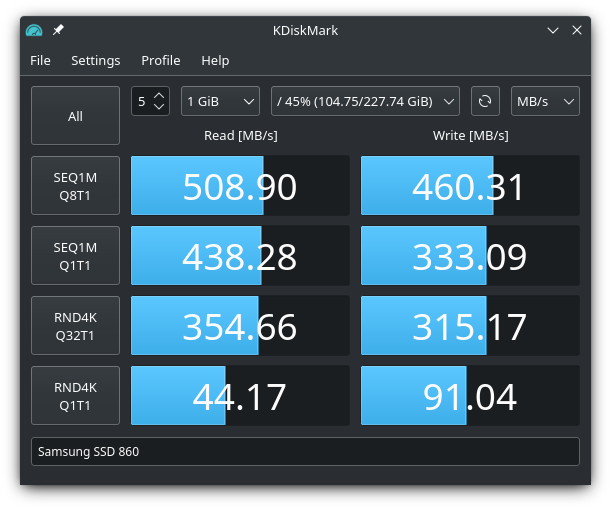
- Configurable block size, queues, and threads count for each test
- Many languages support
- Report generation
                     KDiskMark (1.6.0): https://github.com/JonMagon/KDiskMark
                 Flexible I/O Tester (fio-3.16): https://github.com/axboe/fio
-----------------------------------------------------------------------------
* MB/s = 1,000,000 bytes/s [SATA/600 = 600,000,000 bytes/s]
* KB = 1000 bytes, KiB = 1024 bytes

[Read]
Sequential 1 MiB (Q= 8, T= 1):   542.516 MB/s [    529.8 IOPS] < 14415.61 us>
Sequential 1 MiB (Q= 1, T= 1):   452.596 MB/s [    442.0 IOPS] <  2248.08 us>
    Random 4 KiB (Q=32, T=16):   271.553 MB/s [  67889.0 IOPS] <  1955.57 us>
    Random 4 KiB (Q= 1, T= 1):    43.252 MB/s [  10813.1 IOPS] <    90.34 us>

[Write]
Sequential 1 MiB (Q= 8, T= 1):   513.605 MB/s [    501.6 IOPS] < 15319.33 us>
Sequential 1 MiB (Q= 1, T= 1):   428.900 MB/s [    418.8 IOPS] <  2369.68 us>
    Random 4 KiB (Q=32, T=16):   165.142 MB/s [  41286.6 IOPS] <  3091.38 us>
    Random 4 KiB (Q= 1, T= 1):   103.696 MB/s [  25924.1 IOPS] <    36.71 us>

Profile: Default
   Test: 32 MiB (x5) [Interval: 5 sec]
   Date: 2020/09/05 18:31:47
     OS: neon 20.04 [linux 5.4.0-42-generic]
- GCC/Clang C++17 (or later)
- CMake >= 3.5
- Extra CMake Modules
- Qt with Widgets >= 5.9
- Flexible I/O Tester with libaio >= 3.1
- If you build FIO from source, install
libaio-devpackage.
- If you build FIO from source, install
Binaries are available on the Releases page.
sudo add-apt-repository ppa:jonmagon/kdiskmark
sudo apt update
sudo apt install kdiskmarkgit clone https://aur.archlinux.org/kdiskmark.git
cd kdiskmark
makepkg -sisudo dnf copr enable atim/kdiskmark -y
sudo dnf install kdiskmarkYou can build KDiskMark by using the following commands:
mkdir build && cd build
cmake -D CMAKE_BUILD_TYPE=Release ..
cmake --build .To help with localization you can use Qt Linguist. Add a new language file to the TS_FILES variable in CMakeLists.txt, translate it and create a pull request. It is also possible to add localized Comment and Keywords sections into kdiskmark.desktop.
Languages currently available:
- Czech
- English (default)
- French
- German
- Italian
- Portuguese (Brazilian)
- Russian
- Windows compatibility
- Performance profiles (mix, peak, real-world)
Application Icon
Copyright (c) https://www.iconfinder.com/baitisstudio
If you have any ideas, critics, suggestions or whatever you want to call it, please open an issue.


