A VS Code extension for quick inspection of FMU files (Functional Mock-up Interface 2.0 & 3.0).
-
Open any
.fmufile directly in VS Code as a custom editor -
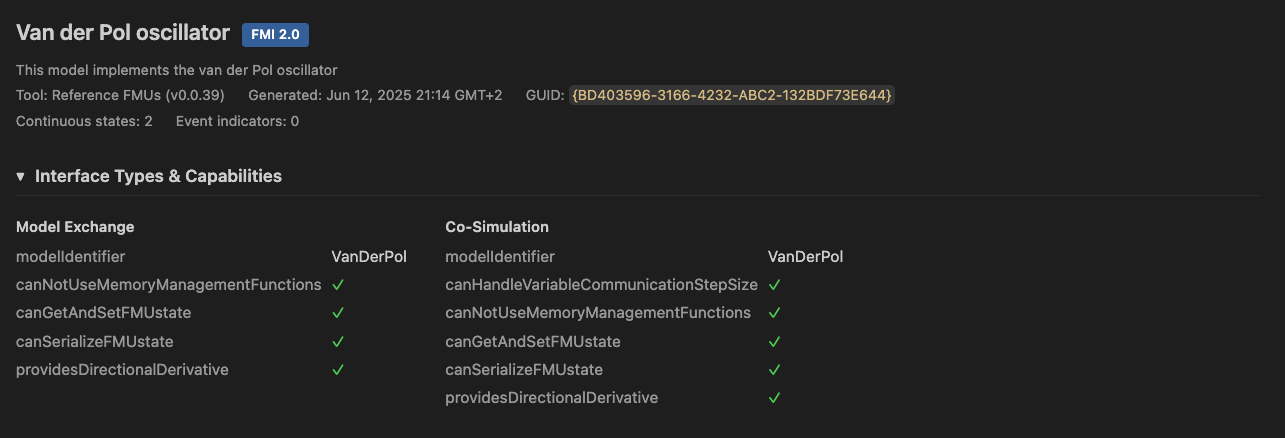
Model metadata — name, FMI version, generation tool, timestamp, GUID/token
-
Interface types & capabilities — Model Exchange, Co-Simulation, Scheduled Execution with all capability flags
-
Platform detection — shows which binaries are included (e.g.
x86_64-linux,aarch64-darwin) -
Variable browser — filterable, sortable table with virtual scrolling for large models (400k+ variables)
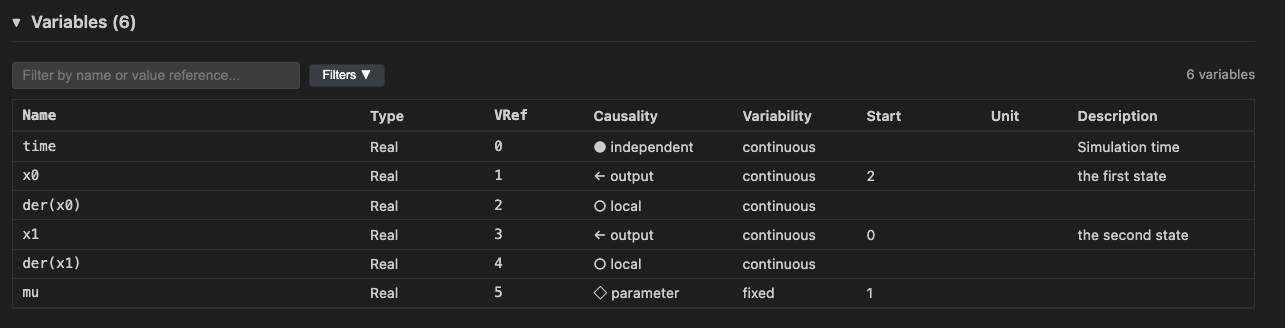
- Filter by name or value reference
- Filter by causality (input, output, parameter, local, independent)
- Filter by variability (constant, fixed, tunable, discrete, continuous)
- Click-to-copy on variable names and value references
-
Contents tree — ASCII folder tree of the FMU archive contents
-
Theme integration — follows your VS Code color theme
- Only displays data from the FMU archive structure and
modelDescription.xml— runtime information (e.g. actual variable values) is not available - No simulation of FMUs; binaries inside the archive are never executed
npm install
npm run build
Press F5 in VS Code to launch the Extension Development Host.
Tests download the Reference FMUs automatically on first run.
npm testParts of this codebase were generated or co-authored with the assistance of AI tools (Claude Code).
