
- Distributions
- Learning Resources
- X Desktop Environments
- X Windows Managers
- Applications
- Useful Websites
- Other Useful Awesome Lists
- License
Distributions are organized into three different categories: for beginners, for intermediate users and for advanced users. In those categories, the distributions are organized in the alphabetical order.
elementary OS is a Linux distribution based on Ubuntu. It makes use of a desktop with its own shell named Pantheon, and is deeply integrated with other elementary OS applications like Plank (a dock), Midori (the default web browser) and Scratch (a simple text editor). This distribution uses Gala as its window manager, which is based on Mutter.
Latest version: elementary OS Freya (0.3)
Default Desktop Environment: Pantheon

Fedora (formerly Fedora Core) is an operating system based on the Linux kernel, developed by the community-supported Fedora Project and sponsored by Red Hat. Fedora contains software distributed under a free and open source license and aims to be on the leading edge of such technologies.
Latest version: Fedora Twenty Two (22)
Default Desktop Environment: GNOME
Screenshot:

Linux distribution based on Ubuntu and Debian, with an alternative Linux Mint Debian Edition (LMDE) based purely on Debian. Mint provides full out-of-the-box multimedia support by including some proprietary software such as Adobe Flash.
Latest version: Rebecca (17.1)
Default Desktop Environment: Cinnamon and MATE
Screenshot:

Debian-based Linux operating system, with Unity as its default desktop environment. It is based on free software and named after the Southern African philosophy of ubuntu (literally, "human-ness"), which often is translated as "humanity towards others" or "the belief in a universal bond of sharing that connects all humanity".
Latest version: Ubuntu 15.04 (Vivid Vervet)
Default Desktop Environment: Unity
Screenshot:

CentOS (abbreviated from Community Enterprise Operating System) is a Linux distribution that attempts to provide a free, enterprise-class, community-supported computing platform which aims to be functionally compatible with its upstream source, Red Hat Enterprise Linux (RHEL). In January 2014, CentOS announced the official joining with Red Hat while staying independent from RHEL, under a new CentOS governing board.
Latest version: CentOS 7.1
Default Desktop Environment: GNOME
Screenshot:

Unix-like computer operating system and a Linux distribution that is composed entirely of free and open-source software, most of which is under the GNU General Public License, and packaged by a group of individuals known as the Debian project. Currently, the Debian project offers three branches named "stable", "testing" and "unstable".)
Latest version: Debian Jessie (8.0)
Default Desktop Environment: GNOME
Screenshot:

French national Linux computer operating system, distributed as free and open source software. It is forked from the Mandriva Linux distribution. The first release of the software distribution, Mageia 1, took place in June 2011.
Latest version: Mageia 5
Default Desktop Environment: KDE
Screenshot:

General-purpose operating system built on top of the Linux kernel. It is developed by the community-supported openSUSE Project and sponsored by SUSE and a number of other companies. On 4 November 2003, Novell announced the acquisition of SuSE Linux AG at a price of US$210 million. After Novell acquired SUSE Linux in January 2004, the company used openSUSE as a logo, but typically is referred to as OpenSuse by contemporary technical publications. Novell decided to release the SUSE Linux Professional product as a 100% open source project. In 2011, The Attachmate Group acquired Novell and split Novell and SUSE into two autonomous subsidiary companies. SUSE offers products and services around SUSE Linux Enterprise—their commercial offering that is based on openSUSE Linux.
Latest version: openSUSE 13.2
Default Desktop Environment: KDE
Screenshot:

Linux distribution for i686 and x86-64 computers. It is composed predominantly of free and open-source software, and supports community involvement.
Latest version: Not applicable (Rolling Release system)
Default Desktop Environment: Not applicable (there's no default Desktop environment)
Screenshot: Not applicable (there's no default look)
Empty for now.
To add new content to this section, please refer to CONTRIBUTING.md file.
Organized by the Linux Foundation, it's a great free course to learn basics about Linux. - @aleksandar-todorovic
If you used Windows and decided to switch to Linux, this course should help you to find their alternatives. It's pretty short and you can finish it in a day. - @aleksandar-todorovic
You cannot talk about a unified Linux look because there is no such thing.
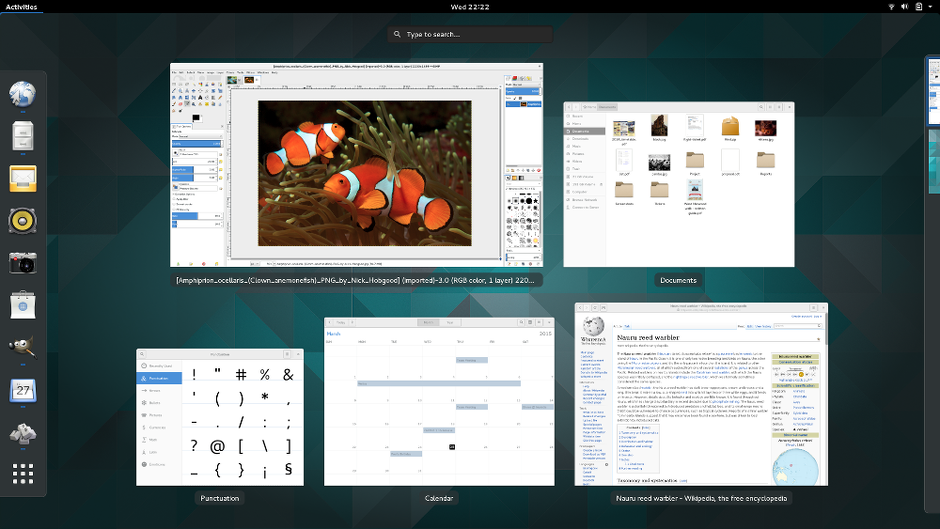
GNOME 3 is an easy and elegant way to use your computer. It is designed to put you in control and bring freedom to everybody. GNOME 3 is developed by the GNOME community, a diverse, international group of contributors that is supported by an independent, non-profit foundation.
The KDE® Community is an international technology team dedicated to creating a free and user-friendly computing experience, offering an advanced graphical desktop, a wide variety of applications for communication, work, education and entertainment and a platform to easily build new applications upon. We have a strong focus on finding innovative solutions to old and new problems, creating a vibrant atmosphere open for experimentation.

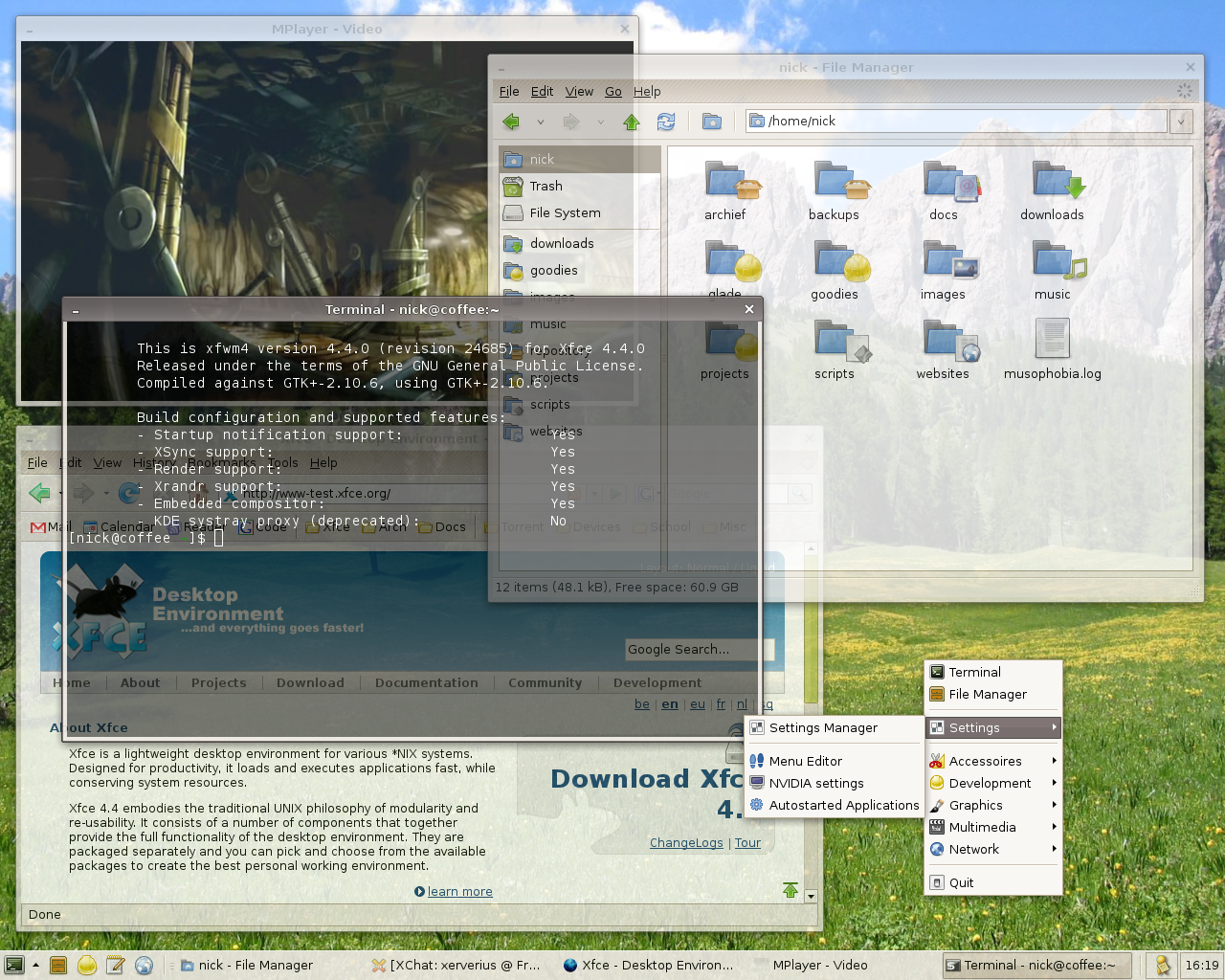
Xfce is a lightweight desktop environment for UNIX-like operating systems. It aims to be fast and low on system resources, while still being visually appealing and user friendly.
The "Lightweight X11 Desktop Environment" is an extremely fast-performing and energy-saving desktop environment. Maintained by an international community of developers, it comes with a beautiful interface, multi-language support, standard keyboard short cuts and additional features like tabbed file browsing. LXDE uses less CPU and less RAM than other environments. It is especially designed for cloud computers with low hardware specifications, such as netbooks, mobile devices (e.g. MIDs) or older computers. LXDE can be installed on many Linux distributions including Debian, Fedora, OpenSUSE and Ubuntu. It is the standard for Knoppix and lubuntu. LXDE also runs on OpenSolaris and BSD. LXDE provides a fast desktop experience; connecting easily with applications in the cloud. LXDE supports a wealth of programs that can be installed locally with Linux systems. The source code of LXDE is licensed partly under the terms of the GNU General Public License and partly under the LGPL.

- Cinnamon - Cinnamon strives to provide a traditional user experience. Cinnamon is a fork of GNOME 3.
- EDE - EDE is a small desktop environment built to be responsive, light in resource usage and to have a familiar look and feel.
- Enlightenment - The Enlightenment desktop shell provides an efficient window manager based on the Enlightenment Foundation Libraries along with other essential desktop components like a file manager, desktop icons and widgets. It supports themes, while still being capable of performing on older hardware or embedded devices.
- LXQt - LXQt is the Qt port and the upcoming version of LXDE, the Lightweight Desktop Environment. It is the product of the merge between the LXDE-Qt and the Razor-qt projects: A lightweight, modular, blazing-fast and user-friendly desktop environment.
- MATE - Mate provides an intuitive and attractive desktop to Linux users using traditional metaphors. MATE is a fork of GNOME 2.
- Pantheon - Pantheon is the default desktop environment originally created for the elementary OS distribution. It is written from scratch using Vala and the GTK3 toolkit. With regards to usability and appearance, the desktop has some similarities with GNOME Shell and Mac OS X.
- Unity - Unity is a shell for GNOME designed by Canonical for Ubuntu.
- 9wm - 9wm is an X window manager which attempts to emulate the Plan 9 window manager 8-1/2 as far as possible within the constraints imposed by X.
- awesome - awesome is a highly configurable, next generation framework window manager for X. It is very fast, extensible and licensed under the GNU GPLv2 license.
- Blackbox - Blackbox is the fast, lightweight window manager for the X Window System you have been looking for, without all those annoying library dependencies. Blackbox is built with C++ and contains completely original code (even though the graphics implementation is similar to that of WindowMaker).
- Compiz - OpenGL compositing window manager. It has a plug-in system to be changed at runtime
- dwm - dwm is a dynamic window manager for X. It manages windows in tiled, monocle and floating layouts. All of the layouts can be applied dynamically, optimising the environment for the application in use and the task performed.
- Enlightenment - Enlightenment is not just a window manager for Linux/X11 and others, but also a whole suite of libraries to help you create beautiful user interfaces with much less work than doing it the old fashioned way and fighting with traditional toolkits, not to mention a traditional window manager
- Fluxbox - Fluxbox is a windowmanager for X that was based on the Blackbox 0.61.1 code. It is very light on resources and easy to handle but yet full of features to make an easy, and extremely fast, desktop experience. It is built using C++ and licensed under the MIT-License.
- FVWM - FVWM is an extremely powerful ICCCM-compliant multiple virtual desktop window manager for the X Window system
- i3 - i3 is a tiling window manager, completely written from scratch. The target platforms are GNU/Linux and BSD operating systems, our code is Free and Open Source Software (FOSS) under the BSD license. i3 is primarily targeted at advanced users and developers.
- IceWM - IceWM is a window manager for the X Window System (freedesktop, XFree86). The goal of IceWM is speed, simplicity, and not getting in the user's way.
- JWM - JWM is a light-weight window manager for the X11 Window System. JWM is written in C and uses only Xlib at a minimum. Because of its small footprint, JWM makes a good window manager for older computers and less powerful systems, such as the Raspberry Pi, though it is perfectly capable of running on modern systems.
- Matchbox - Matchbox is an Open Source base environment for the X Window System running on non-desktop embedded platforms such as handhelds, set-top boxes, kiosks and anything else for which screen space, input mechanisms or system resources are limited.
- Mutter - Mutter is a window manager for the X Window System, and is in the process of becoming a Wayland compositor; it became the default window manager in GNOME 3, replacing Metacity.
- Openbox - Openbox is a highly configurable, next generation window manager with extensive standards support.
- pekwm - pekwm is a window manager that once upon a time was based on the aewm++ window manager, but it has evolved enough that it no longer resembles aewm++ at all.
- ratpoison - Ratpoison is a simple Window Manager with no fat library dependencies, no fancy graphics, no window decorations, and no rodent dependence. It is largely modelled after GNU Screen which has done wonders in the virtual terminal market.
- Sawfish - Sawfish is an extensible window manager using a Lisp-based scripting language. Its policy is very minimal compared to most window managers. Its aim is simply to manage windows in the most flexible and attractive manner possible.
- wmii - A small, scriptable window manager, with a 9P filesystem interface and an acme-like layout.
- xmonad - xmonad is a dynamically tiling X11 window manager that is written and configured in Haskell. In a normal WM, you spend half your time aligning and searching for windows. xmonad makes work easier, by automating this.
The list of awesome Linux applications that you should be using.
- git - Git is a free and open source distributed version control system designed to handle everything from small to very large projects with speed and efficiency. Git is easy to learn and has a tiny footprint with lightning fast performance. It outclasses SCM tools like Subversion, CVS, Perforce, and ClearCase with features like cheap local branching, convenient staging areas, and multiple workflows.
- nano - GNU nano (or nano) is a text editor which aims to introduce a simple interface and intuitive command options to console based text editing. nano supports features including colorized syntax highlighting, DOS/Mac file type conversions, spellchecking and UTF-8 encoding. nano opened with an empty buffer typically occupies under 1.5 MB of resident memory.
- vim - Vim is an advanced text editor that seeks to provide the power of the de-facto Unix editor 'Vi', with a more complete feature set.
- vtop - Command-line tools like “top” make it difficult to see CPU usage across multi-process applications (like Apache and Chrome), spikes over time, and memory usage. Vtop is a free and open source activity monitor for the command line. It’s written in node.js and can be easily extended.
Empty for now.
To add new content to this page, please refer to CONTRIBUTING.md file.
- Gedit - Gedit is the GNOME text editor. While aiming at simplicity and ease of use, gedit is a powerful general purpose text editor.
- Gnome Builder - Builder is a new IDE for GNOME that is focused on bringing the power of our platform to more developers than ever before. It is currently under heavy development and needs your help to become a success.
for general gnome apps, visit: https://wiki.gnome.org/Apps
Empty for now.
To add new content to this page, please refer to CONTRIBUTING.md file.
Empty for now.
To add new content to this page, please refer to CONTRIBUTING.md file.
- Y PPA Manager (Ubuntu) - Search for packages in Launchpad PPAs.
- PacmanXG (Arch) - GUI front-end for pacman. Depends on neither GTK+ nor Qt, just X11.
- pirut (Fedora) - pirut provides a set of graphical tools for managing software.
- Synaptics (Debian and .deb users) - Synaptic is a graphical package management program for apt. It provides the same features as the apt-get command line utility with a GUI front-end based on Gtk+.
- YaST (openSUSE) - YaST is the main package management tool on openSUSE.
- YumEx (Fedora) - YumEx is a GUI for the dnf package manager, it is written in Python and is using the PyGTK toolkit for GUI Components.
A friendly place to start for the Free & Open Source Software and Linux curious.
The Linux Foundation is a non-profit consortium dedicated to fostering the growth of Linux. Founded in 2000, The Linux Foundation sponsors the work of Linux creator Linus Torvalds and is supported by leading Linux and open source companies and developers from around the world.
For the community, by the community, Linux.com strives to be the central source for informed, reasonable, and intelligent Linux information, software, documentation and answers across the server, desktop/netbook, mobile, and embedded areas.
Although its design is outdated, Linux.org is (probably) the most popular forum and it's full of awesome Linux tutorials categorized by their difficulty. - @aleksandar-todorovic
The Linux Kernel Organization is a California Public Benefit Corporation established in 2002 to distribute the Linux kernel and other Open Source software to the public without charge.
Opensource.com is an online publication focused on how open source is applied to different areas including business, education, government, health, law and other disciplines of life.
Our goal is to further the open source way by sharing the open source movement. Our community of readers is made up of those who believe that open participation and sharing can tackle the business, social, environmental, and technological challenges facing us today.
- awesome
- awesome lists for programming languages
- awesome-shell
- awesome-emacs
- awesome-vim
- awesome-sysadmin
This license is licnesed under the Do What the Fuck You Want to Public License. Its full content is located in the LICENSE file.
