A small TUI library with a clean renderer and simple, readable APIs.
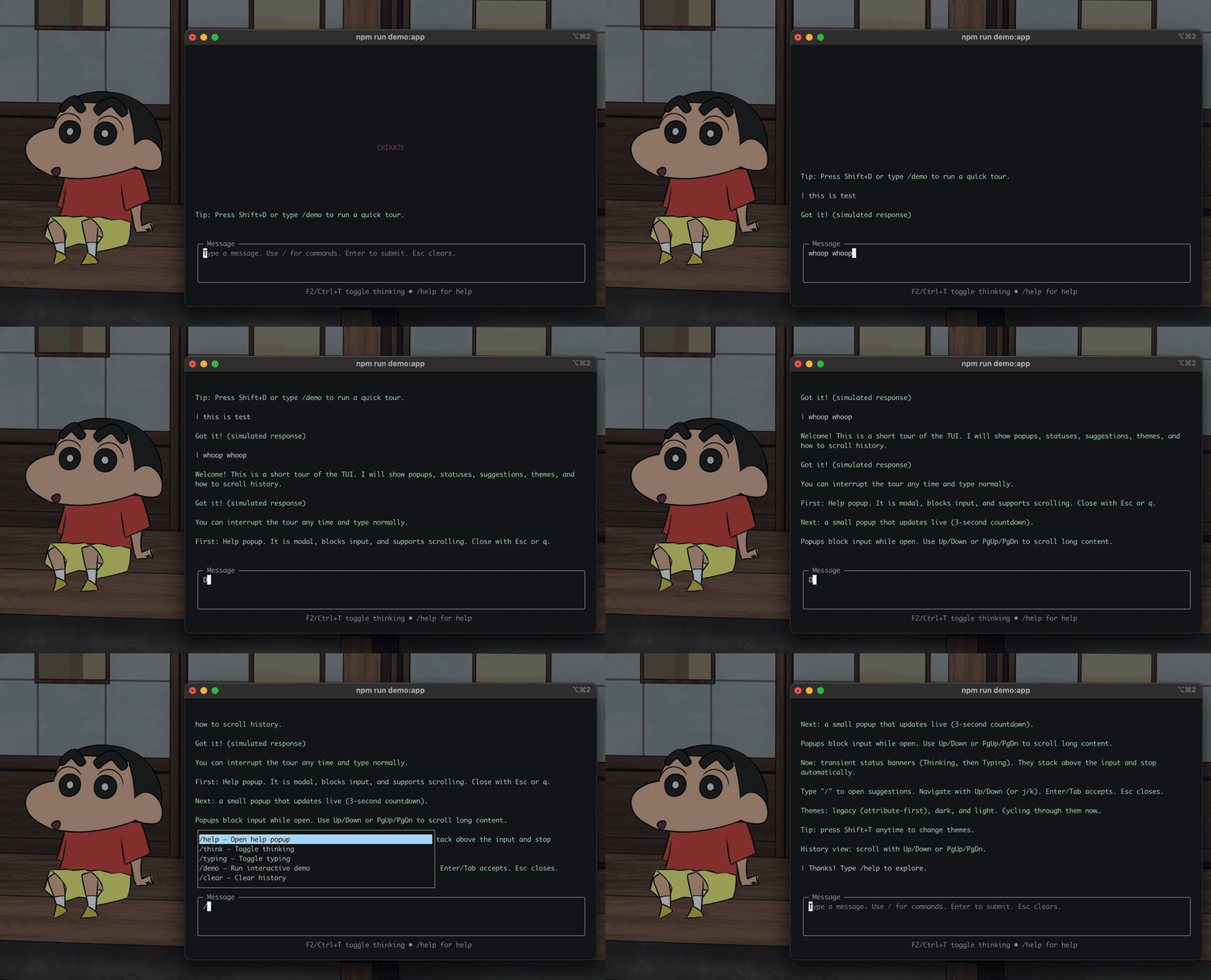
Chikate helps you build fast, flicker‑free terminal apps. It focuses on a deterministic renderer, sane input handling, and APIs that read like English.
- A tiny toolkit for terminal UIs.
- A diff‑based renderer for stable frames and clean resizes.
- A few widgets and facades that make common app flows straightforward.
- Builder‑friendly: APIs that read like English (Page.full(...).margin(2).row()).
- Deterministic frames: no flicker, no surprises, predictable diffs.
- Resilient input: normalized keys, bracketed paste, focus routing.
- Minimal by default: opt‑in features; low ceremony.
- Built to evolve: stable core, optional sugar layers.
npm i @chikate/chikate
- Node.js only (CommonJS). Tested on Node 18+.
- Runs in a terminal (macOS Terminal, iTerm2, Linux terminals, Windows Terminal/WSL).
- Not for browsers.
const { withApp, Page, widgets: { InputField, HistoryView }, OverlayStack, theme } = require('@chikate/chikate');

withApp(({ screen, sched, stdin, keys, timers }) => {
  const history = new HistoryView({ title: 'History', showTimestamps: true });
  const input = new InputField({ title: 'Input', hint: 'Enter sends, Esc clears' });
  const overlays = new OverlayStack();

  // Layout and paint on each frame
  sched.on('paint', () => {
    const page = Page.full(screen).margin(1);
    const [top, bottom] = page.column(1).add({ minHeight: 6, flex: 1 }, { minHeight: input.measureHeightForWidth(screen.size().width) });
    history.paint(screen, top);
    input.cfg = { ...input.cfg, ...bottom };
    input.paint(screen);
  });
  sched.on('render', () => screen.endFrame({ cursor: input.getCursorScreenPos(), showCursor: true }));

  // Keys: route to input, add to history on submit
  keys.on('key', ev => {
    // Exit: press Ctrl+C twice within ~1s in examples/app_demo.js.
    // For quickstarts, you can exit immediately:
    if (ev.name === 'Ctrl+C') return process.exit(0);
    if (input.handleKey(ev.seq)) {
      if (ev.name === 'Enter' && input.value) {
        history.push({ who: 'you', text: input.value, ts: Date.now() });
        input.setValue('');
        history.scrollToEnd();
      }
      sched.requestFrame();
      return;
    }
  });
});- Core:
Screen,Scheduler. - Facades:
withApp,Page. - Input:
FocusManager,KeyParser,Keys. - Time:
TimerRegistry. - Overlay:
OverlayStack. - Widgets:
Box,Text,InputField,PopupOverlay,HistoryView,ThinkingIndicator,Logo,ProgressBar. - Utils:
wrapToWidth,measureWidth,times. - Theme:
getTheme,setTheme,cycleTheme,overrideTheme, presetsDARK/LIGHT/LEGACY.
API stubs live in docs/framework/*:
- Screen, Scheduler, Layout, Widgets, Theme, Input/Keys, Timer, History, withApp.
- Flicker‑free cursor: hides only when needed; stable placement.
- Clean resizes: hard clear + immediate repaint; debounced follow‑up.
- Unicode wrapping: grapheme‑aware width; better emoji/CJK handling.
- Practical widgets: Input with suggestions, History with timestamps, popups, progress.
- Friendly sugar:
Page, fluent builders (experimental),Keys.map,times(n, fn).
- Alt‑screen, cursor style (optional DECSCUSR), bracketed paste on by default.
- Mouse is planned; currently off by default.
- Resize via
process.stdout.on('resize')with a debounced repaint.
- Start at
0.1.0(semver). Core stays stable; sugar may evolve. - Fluent builders are experimental; expect changes behind minor bumps.
- See
examples/for a guided demo, progress bar, key parser + timers, and a fluent quickstart.
- Using the framework:
docs/using-the-framework.md- Exit: press Ctrl+C twice within 1s (examples use a confirmation window).
- Help: type
/help(optionally bind F1); avoid binding?globally. - Status: Thinking/Typing appear as transient banners above the input; not logged to history by default.
- Rendering and resize:
docs/rendering-ideas.md,docs/resize.md - Principles:
docs/engineering-principles.md,docs/ousterhout-improvement-usability.md - Making a library:
docs/making-library.md
MIT (see package.json).
