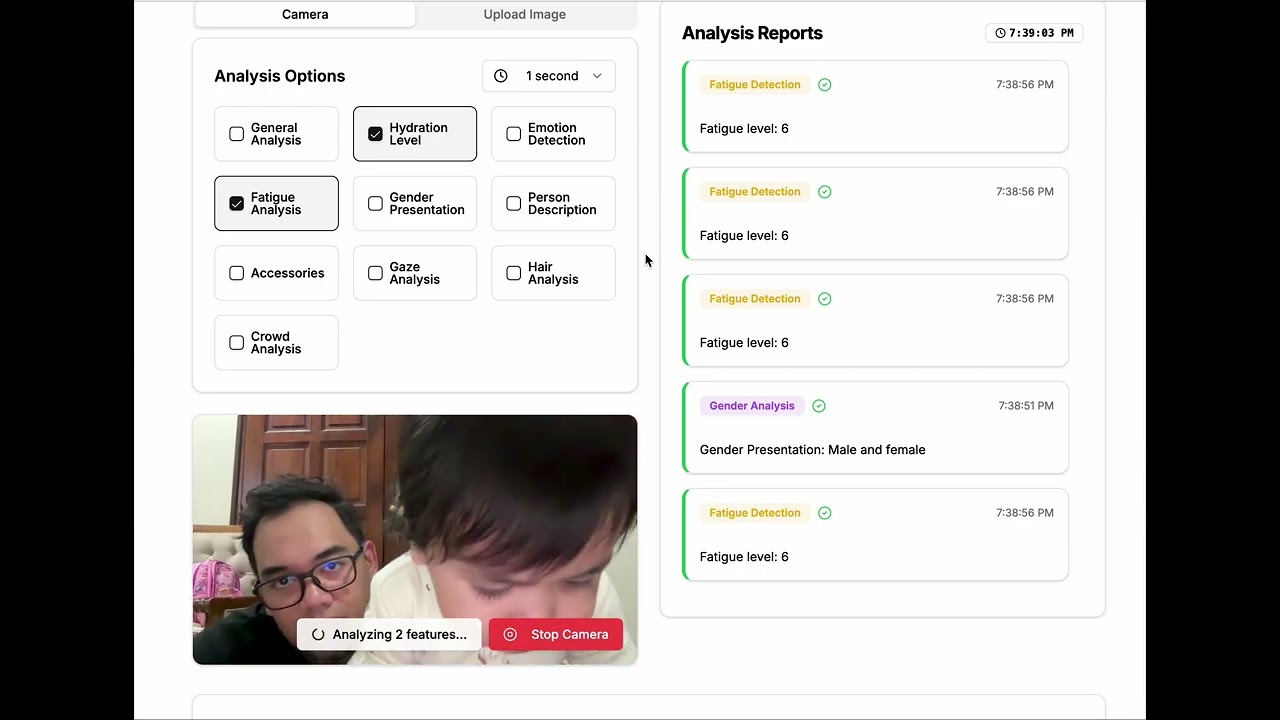
This project is a real-time computer vision application built with Typescript, Next.js and TailwindCSS that leverages the Moondream AI model for advanced visual analysis. Here's how it works:

- Captures live video feed from the user's camera
- Processes frames at configurable intervals (1-10 seconds or live)
- Uses HTML5 Canvas for drawing overlays and visualizations
The app can analyze various aspects of the video feed:
- General Analysis: Overall scene interpretation and context
- Emotion Detection: Facial expression and emotional state analysis
- Fatigue Analysis: Signs of tiredness using facial indicators
- Gender Presentation: Analysis of apparent gender presentation
- Person Description: Detailed physical characteristics
- Accessories: Detection of worn items and accessories
- Gaze Analysis: Eye tracking and attention direction
- Hair Analysis: Detailed hair characteristics assessment
- Crowd Analysis: Group dynamics and demographic patterns
- Custom Analysis: User-defined analysis prompts for specialized use cases
The application now includes powerful custom analysis capabilities that allow users to define their own analysis prompts:
- Custom Prompt Input: Text field for users to specify exactly what they want to analyze
- Custom-Only Mode: Option to use only custom analysis, bypassing all predefined analysis types
- Flexible Analysis: Analyze anything visible in the camera feed using natural language prompts
- Real-time Custom Analysis: Custom prompts work with live camera feed and video uploads
- Cross-Provider Support: Works with all supported vision providers (Ollama, Moondream, Moondream-local)
- Enable Custom-Only Mode: Check the "Use Custom Analysis Only" checkbox (enabled by default)
- Enter Your Prompt: Type your analysis request in the custom prompt field
- Example: "Count the number of people in the frame"
- Example: "Describe the lighting conditions and suggest camera settings"
- Example: "Identify any safety hazards in the workspace"
- Example: "Analyze the body language and suggest mood"
- Start Analysis: The system will use your custom prompt instead of predefined analysis types
- Mixed Mode: Uncheck custom-only mode to use both custom prompts and predefined analysis types
- Educational: "Explain what's happening in this scene for a 5-year-old"
- Professional: "Identify any workplace safety issues or violations"
- Creative: "Describe this scene as if writing a movie script"
- Technical: "List all electronic devices visible and their approximate condition"
- Medical: "Describe any visible signs of stress or fatigue"
- Security: "Note any unusual objects or behaviors in the frame"
The application leverages the powerful Moondream vision model which provides:
- Advanced Scene Understanding: Deep comprehension of visual contexts and environments
- Multi-modal Analysis: Combines visual perception with natural language understanding
- Real-time Processing: Optimized for live video stream analysis with minimal latency
- Precise Object Detection: Accurate identification and localization of objects, people, and features
- Contextual Reasoning: Ability to understand relationships between elements in the scene
- Adaptive Analysis: Dynamic adjustment to different lighting conditions and environments
- High Accuracy: State-of-the-art computer vision performance for reliable results
- Local Processing: Complete privacy with no cloud dependencies
The application includes comprehensive dark mode functionality:
- Automatic Theme Detection: Respects system-wide dark/light mode preferences
- Manual Toggle: Users can manually switch between light and dark themes
- Consistent Styling: All UI components adapt seamlessly to the selected theme
- Enhanced Visibility: Optimized contrast ratios for better visibility in low-light conditions
- Canvas Overlays: Analysis visualizations adapt to match the current theme
- Persistent Preference: Theme selection is saved and restored across sessions
- Smooth Transitions: Elegant theme switching animations for better user experience
- Uses Moondream AI model running locally via Ollama
- Implements caching system for recent analyses (5-second cache)
- Features retry mechanism with exponential backoff
- Supports multiple face detection and tracking
- Real-time visualization of gaze directions and connections
- Clean, modern interface using TailwindCSS
- Responsive design that works across devices
- Interactive controls for analysis type selection
- Adjustable time intervals for analysis frequency
- Real-time feedback and visualization overlays
- Efficient frame processing
- Request debouncing to prevent overload
- Smooth rendering using requestAnimationFrame
- Automatic resizing and responsive canvas
-
All processing happens locally on the user's machine
-
No data sent to external servers
-
No image storage or persistence
Demo Video
- The camera feed is captured using the
getUserMediaAPI - Frames are processed at the selected interval
- Analysis Selection: Users can choose between predefined analysis types or create custom analysis prompts
- Custom Analysis: When custom prompts are provided, they are sent along with the image data to the vision model
- The image data and analysis instructions are sent to the local Moondream model via Ollama
- Analysis results are processed and displayed in real-time
- Visual overlays are drawn on the canvas for features like gaze tracking
- Results can be interacted with through the UI
The application provides a comprehensive suite of computer vision analysis tools while maintaining privacy and performance by running everything locally on the user's machine. With the new custom analysis feature, users can now analyze any aspect of their video feed using natural language prompts.
This project supports multiple ways to run Moondream locally. Choose the method that works best for your system:
Moondream Station is the easiest and most efficient way to run Moondream locally. It's a free, open-source tool that eliminates the complexities of Python installations, dependencies, and technical setups.
- 100% Free: No cost, just powerful vision-language capabilities
- Easy Installation: Simplified setup to quickly get you started
- Local Performance: Run models locally for optimal speed and privacy
- Automatic Updates: Effortless maintenance and up-to-date features
- No Technical Headaches: Skip Python setups, dependencies, and configurations
- Mac: Apple Silicon (M1, M2, M3) or Intel-based Macs
- Linux: Most modern distributions supported
- Windows: Support coming soon
- Memory: At least 4GB of available RAM recommended
- Storage: ~2GB for model and application files
For Mac & Linux:
curl https://depot.moondream.ai/station/install.sh | bashAlternative manual installation:
- Visit https://moondream.ai/station
- Download the installer for your operating system
- Follow the installation wizard
- Launch Moondream Station from your applications
After installation, verify that Moondream Station is running:
# Check if Moondream Station is running
curl http://localhost:8888/health- Quick and Hassle-Free Installation: Get up and running in minutes
- Seamless Command Line Integration: Easy terminal access and API integration
- Always Current: Automatic model updates and improvements
- Privacy First: All processing happens locally on your machine
- Developer Friendly: Clean API for easy integration with applications
- Moondream Station includes optional usage tracking for tool improvement
- You can disable telemetry anytime with:
admin toggle-metrics --confirm - Important: It never collects your images or personal data
- Only high-level usage, performance, and error data is collected
If you prefer using Ollama or encounter issues with Moondream Station:
- Install Ollama from https://ollama.ai
- Ensure you have at least 4GB of available RAM
- Have a working internet connection for initial model download
# Pull the Moondream model
ollama pull moondream

# Run Moondream
ollama run moondreamOnce you have either Moondream Station or Ollama running, set up the LCLV application:
# Clone the repository
git clone https://github.com/HafizalJohari/lclv.git

# Navigate to project directory
cd lclv

# Install dependencies
npm install

# Start the development server
npm run devOpen your browser and navigate to http://localhost:3000 to start using the Local Computer Vision application.
Moondream Station Issues:
- Ensure your system meets the minimum requirements
- Check that port 8888 is not being used by another application
- For Mac users: You may need to allow the application in System Preferences > Security & Privacy
Ollama Issues:
- Verify Ollama is properly installed and running
- Check that the Moondream model downloaded correctly with
ollama list - Ensure port 11434 (default Ollama port) is available
Application Issues:
- Make sure Node.js (version 16+) is installed
- Clear browser cache and reload the page
- Check browser console for any error messages
- Documentation: https://docs.moondream.ai
- Community Support: Join the Discord community
- GitHub Issues: Report bugs on the Moondream GitHub
Reference Links:
- Moondream Station: https://moondream.ai/station
- Moondream GitHub: https://github.com/vikhyat/moondream
- Ollama: https://ollama.ai
- ✨ NEW: Added custom analysis prompt input field
- ✨ NEW: "Use Custom Analysis Only" mode with checkbox (enabled by default)
- ✨ NEW: Support for user-defined analysis prompts in natural language
- 🔧 IMPROVED: All vision providers now support custom prompts (Ollama, Moondream, Moondream-local)
- 🔧 IMPROVED: Visual indicators when custom-only mode is active
- 🔧 IMPROVED: Enhanced UI with better user guidance and validation
- 🔧 IMPROVED: Mixed mode support (custom + predefined analysis types)
- 📱 UI: Added visual feedback for disabled analysis options in custom-only mode
- 🎯 FEATURE: Real-time custom analysis with live camera feed
- 🎯 FEATURE: Custom analysis support for video uploads
- v2.0.0 - Moondream Station support, dark mode, multiple analysis types
- v1.0.0 - Initial release with basic computer vision analysis
MIT License
Copyright (c) 2024 Hafizal Johari
Permission is hereby granted, free of charge, to any person obtaining a copy of this software and associated documentation files (the "Software"), to deal in the Software without restriction, including without limitation the rights to use, copy, modify, merge, publish, distribute, sublicense, and/or sell copies of the Software, and to permit persons to whom the Software is furnished to do so, subject to the following conditions:
The above copyright notice and this permission notice shall be included in all copies or substantial portions of the Software.
THE SOFTWARE IS PROVIDED "AS IS", WITHOUT WARRANTY OF ANY KIND, EXPRESS OR IMPLIED, INCLUDING BUT NOT LIMITED TO THE WARRANTIES OF MERCHANTABILITY, FITNESS FOR A PARTICULAR PURPOSE AND NONINFRINGEMENT. IN NO EVENT SHALL THE AUTHORS OR COPYRIGHT HOLDERS BE LIABLE FOR ANY CLAIM, DAMAGES OR OTHER LIABILITY, WHETHER IN AN ACTION OF CONTRACT, TORT OR OTHERWISE, ARISING FROM, OUT OF OR IN CONNECTION WITH THE SOFTWARE OR THE USE OR OTHER DEALINGS IN THE SOFTWARE.