
Free and Fully Featured PDF Generator for C#/.NET




Home page • Quick start • Guides • Features • API reference • Changelog • Licence • NuGet
- Free, for everyone. MIT-licensed: use it in commercial and closed-source software, with no revenue limits, licence keys or paid tiers.
- Fully featured. Invoices, reports and statements; tables that run across pages; text in both directions and in complex scripts; images and vector artwork; PDF/A archives, accessible tagged PDF and password protection; merging and stamping existing files; and a live preview while you write.
- Plain .NET. The core package is managed code with no native dependencies, for .NET 10 and .NET Standard 2.0 (.NET Framework 4.7.2 and later).
dotnet add package Rustaveli.Pdf| Package | Adds |
|---|---|
 |
Layout, text, images and PDF export: everything most documents need |
 |
Pages as PNG, JPEG or WebP, SVG pages and XPS; image recompression |
 |
Arabic, Hebrew points, and Indic and South-East Asian scripts |
 |
Existing PDF files: merging, stamping, attaching, protecting |
 |
A live preview in the browser, redrawn on hot reload |
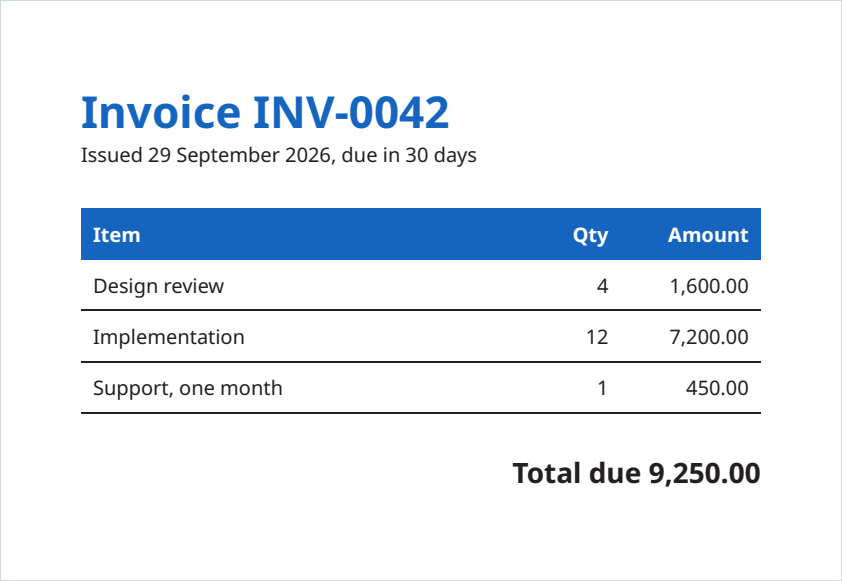
This makes the invoice above:
using Rustaveli.Pdf;

(string Item, string Quantity, string Amount)[] lines =
[
    ("Design review", "4", "1,600.00"),
    ("Implementation", "12", "7,200.00"),
    ("Support, one month", "1", "450.00"),
];

Ink blue = Ink.Hex("#1565C0");

Document invoice = Document.Compose(composition => composition.Section(section =>
{
    section.Trim = PaperSizes.A5;
    section.Margins = Sides.All(40);
    section.DefaultType = TypeStyle.Default.WithPointSize(10);

    section.Body().Stack(stack =>
    {
        stack.SpaceBetween(20);

        stack.Add().Text(text =>
        {
            text.Line("Invoice INV-0042").PointSize(22).Bold().Ink(blue);
            text.Line("Issued 29 September 2026, due in 30 days");
        });

        stack.Add().Table(table =>
        {
            table.Columns(columns =>
            {
                columns.Share();
                columns.Fixed(40);
                columns.Fixed(70);
            });

            table.HeaderRows(header =>
            {
                header.Cell().Fill(blue).Inset(6).Text(text => text.Run("Item").Bold().Ink(Ink.White));
                header.Cell().Fill(blue).Inset(6).FlushRight().Text(text => text.Run("Qty").Bold().Ink(Ink.White));
                header.Cell().Fill(blue).Inset(6).FlushRight().Text(text => text.Run("Amount").Bold().Ink(Ink.White));
            });

            foreach ((string item, string quantity, string amount) in lines)
            {
                table.Cell().StrokeBottom(0.5f).Inset(6).Text(item);
                table.Cell().StrokeBottom(0.5f).Inset(6).FlushRight().Text(quantity);
                table.Cell().StrokeBottom(0.5f).Inset(6).FlushRight().Text(amount);
            }
        });

        stack.Add().FlushRight().Text(text => text.Run("Total due 9,250.00").PointSize(14).Bold());
    });
}));

invoice.ExportPdf("invoice.pdf");- Layout — stacks, columns, tables with repeated header rows and spanning cells, lists, grids and flowing columns; content flows across as many pages as it needs, with running heads and feet and page numbers.
- Typography — OpenType features and kerning, fallback fonts per character, text in both directions, complex scripts with the Shaping package, and Noto Sans built in as the default typeface, so Latin, Greek and Cyrillic text looks the same on every machine.
- Images and artwork — JPEG and PNG embedded as they are, and SVG or drawn paths kept as vectors.
- Standards — PDF/A-2 and PDF/A-3, tagged PDF and PDF/UA for accessibility, and encryption up to AES-256, each checked in the tests by veraPDF and qpdf.
- Existing files — merge, overlay and stamp, attach files (electronic invoices included), protect and linearise.
- Tooling — a live preview in the browser that redraws as you edit, with an inspector that opens the line of code behind any frame.
- Small files — fonts subset to the glyphs used and images embedded as encoded: an 85-page report in 171 KB (performance).
- The documentation, starting with getting started
- API reference
- Coming from QuestPDF, and how the two libraries relate: Rustaveli.Pdf and QuestPDF
- Features and known limitations
- Changelog
MIT — see LICENSE. The bundled Noto Sans is under the SIL Open Font License.

![dependabot[bot]](https://avatars.githubusercontent.com/in/29110?v=4)